|
Beta2 | Beta3 | Beta4 | Beta5 | Beta6 | Beta7 | Beta8 | Beta9 | Beta10 | List | Logs
Change List for iFeelPixel TactileWare
===============================
iFeelPixel™ version 4.0.4
===============================
Compatible with SteelSeries Rival 500/700/710, XBOX, TouchSense Devices, Novint Falcon
"The Universal Multimodal Interface Access: Haptics Technologies for Interactive Accessibility and Virtual Reality"
In association with INRIA
(The French National Institute for research in Computer Science and Control)
Keywords: Tactile Alerts, HyperLink, TouchSense, Visual Force Feedback, Rumble Feedback, Tactile Mobile, Tactile Feedback, Auditory Feedback, Full Force Feedback, Multimodal Interface, Novint Falcon, Touch
Release Date: April 4, 2024 (Status: Stable release for Rival, Xbox, Falcon, TouchSense)
(C) Copyright iFeelPixel Association, all rights reserved, protected by:
Inter Deposit Digital Number (IDDN) certificate from Agency for the Protection of Programs
(R) iFeelPixel is a legal trademark registered at
INPI
· Readme
· Mouse (computing) definition from Wikipedia, the free encyclopedia:
https://en.wikipedia.org/wiki/Computer_mouse
=================
Table
of Contents
=================
1.
New Features
2. Updated Options
3. New Options
4. Optimizations
5. Others updates
6. Know issues
7. Available Features
=====================
Changes Since 1.9 Beta
=====================
1.
New Features:
- DualFeel Gaming: Adaptive Triggers button added for PS gaming controller (v.4.0.0)
- DualFeel Gaming: Menu File > DualSense Support (adaptive triggers Mxater) (v.4.0.0)
- DualFeel Gaming: Menu File > DualSense Firmware (Improve performances) (v.4.0.0)
- DualFeel Gaming: Gamepad Profiler and Controller Settings buttons added (v.4.0.0)
- DualFeel Gaming: Menu File > Main Settings (v.4.0.0)
- DualFeel Gaming: Falcon Force checkbox added (v.4.0.0)
- DualFeel Gaming: Inverse Z-Axis checkbox added (v.4.0.0)
- Novint Falcon: Texture Generation error fixed (v.4.0.0)
- Novint Falcon: Control Mouse checkbox added (v.4.0.0)
- Novint Falcon: Clear forces button added (v.4.0.0)
- Novint Falcon: Driver Links updated (v.4.0.0)
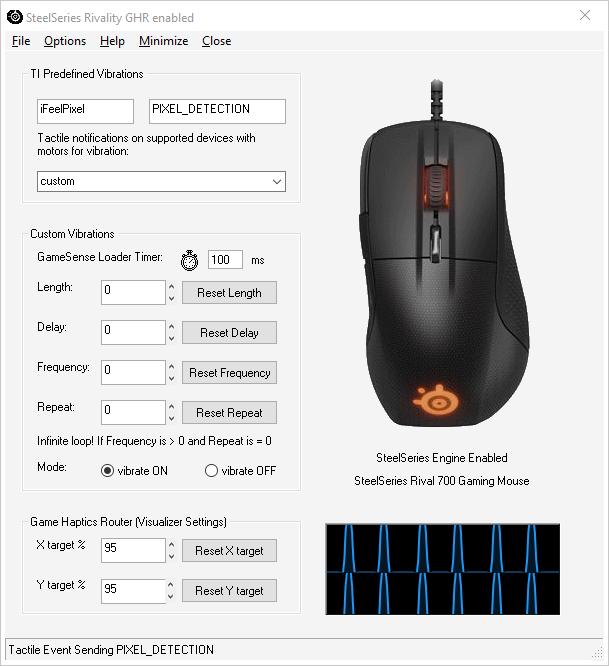
- SteelSeries: 4K UHD target percentage checkbox added (v.4.0.0)
- SteelSeries: X/Y target percentage max value updated to 200% (was 100%) (v.4.0.0)
- SteelSeries: Menu File > Haptic Games > Save target percentage (v.4.0.0)
- SteelSeries: Menu Options > Windows Themes (Display) (v.4.0.0)
- SteelSeries: GHR Window detection improved with Task Monitor (v.3.1.0)
- SteelSeries: File > Haptic Game > Exit Game Haptics Router (GHR) (v.3.1.0)
- SteelSeries: Help > SteelSeries Twitch TV (v.3.1.0)
- SteelSeries: Click Timer to Pause/Resume/Reset GameSense Loader (v.3.1.0)
- DualFeel Gaming: Click Timer to Pause/Resume/Reset DualFeel Timer (v.3.1.0)
- Game Haptics Router finder improved (Class name) (v.3.0.1)
- SteelSeries: Haptic Game > Enable Pixel Detection (v.3.0.1)
- Pixel detected Average (Color Detection Options) (v.3.0.1)
- Game Haptics Router (GHR) fully implemented (v.3.0.0)
- Path > Detection Methods > SteelSeries Rivality (GHR) (v.3.0.0)
- File > Force Resource > Game Haptics Router (v.3.0.0)
- Force Resource: File > Haptic Effects > Game Haptics Router (v.3.0.0)
- SteelSeries: GHR Visualizer Settings (v.3.0.0)
- SteelSeries: File > Haptic Game > Game Haptics Router (v.3.0.0)
- SteelSeries: File > Haptic Game > Disable 50% Effects (v.3.0.0)
- SteelSeries: File > Haptic Game > Show Visualizer (v.3.0.0)
- SteelSeries: File > Haptic Game > Anti-Minimizer (v.3.0.0)
- SteelSeries: Disable Tactile Menu updated for Gaming Devices (v.3.0.0)
- SteelSeries: Options > Force Resource (v.3.0.0)
-TouchSound: File > Game Haptics Router (v.3.0.0)
- DualFeel Gaming: File > Gaming Controllers > Show Cursor Coordinates (v.3.0.0)
- TONAR: Visual Force Feedback improved for Full Screen Size (v.3.0.0)
- DualFeel Gaming > File > Gaming Controllers > Horizontal layout (v.2.9.2)
- DualFeel Gaming > reWASD Service > Start/Stop reWASD Service (v.2.9.0)
- DualFeel: Detect "Controller (XBOX 360 For Windows)" (v.2.8.8)
- DualFeel: Speed Force set to 250 ms for 100 pixels (v.2.8.8)
- DualFeel: Reverse Echo Radar Animation completed (v.2.8.8)
- DualFeel: File > DirectX Diagnostic Tool (v.2.8.8)
- DualFeel: Options > Novint Falcon Settings (v.2.8.8)
- DualFeel: Rumble Gaming Mouse compatible with Xinput/Dinput mode (v.2.8.7)
- DualFeel: Gaming Controllers detection improved (v.2.8.7)
- DualFeel Fix: Rumble Left/Right Trigger button was not working (Dinput) (v.2.8.7)
- DualFeel issue: Stop Rumble is not implemented in Gamesense SDK (v.2.8.7)
- DualFeel: Rumble Gaming Mouse (Rival 500/700/710, start Tactile Effect) (v.2.8.6)
- DualFeel > Gaming Controllers > Show Xinput Device Data (v.2.8.6)
-DualFeel > Gaming Controllers > Show Gamepad name in Systray (v.2.8.6)
- Joystick to Mouse emulator tooltip updated (POV=Arrow) (v.2.8.6)
- DualFeel Game: POV to Arrow (Down, Up, Left, Right) or POV to Pixel (1by1) (v.2.8.4)
- DualFeel Game > File > Gaming Controllers > Enumerate Officials Controllers (v.2.8.4)
- Detect Human Interface Device (HID) connected (v.2.8.3)
- Path > Detection Methods > Dual Feel Gaming (Game Haptics Router) (v.2.8.1)
- DualFeel Gaming > Options > Metronome System added (v.2.8.1)
- DualFeel supports PS5 DualSense Gaming Controllers (reWASD required) (v.2.8.0)
- DualFeel send tactile effects if any Gaming Controllers buttons are pressed (v.2.8.0)
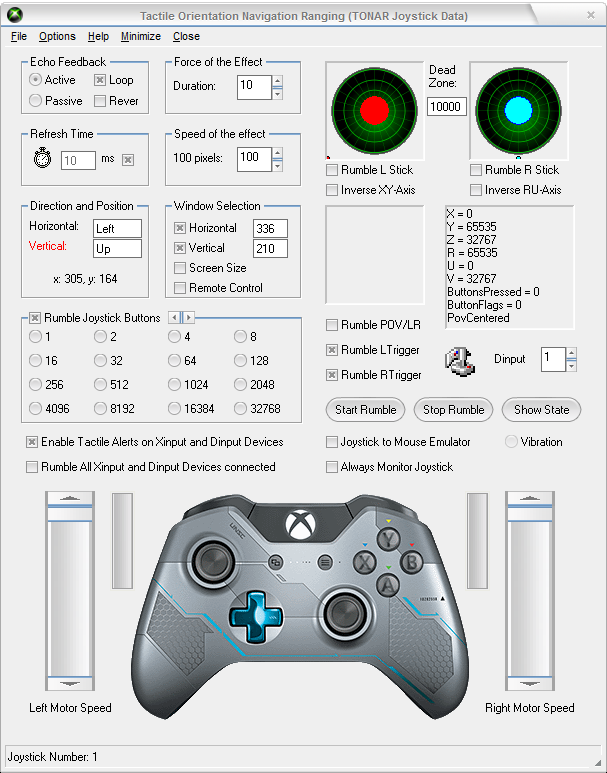
- DualFeel includes a Tactile Orientation Navigation and Ranging (TONAR) (v.2.8.0)
- TONAR Joystick Data renamed to "DualFeel Gaming" (v.2.8.0)
- Echo Feedback renamed to "Echolocation system" (Based on screen size) (v.2.8.0)
- Speed Effect renamed to "Speed Force" (100px: 500ms) (v.2.8.0)
- Rumble POV/LR changed to "Rumble POV" (Independent Triggers) (v.2.8.0)
- Always monitor Joystick renamed to "Always Monitor Gaming Controllers" (v.2.8.0)
- File > Gaming Controllers > Xbox Halo, PS5 DualSense, Switch Pro (v.2.8.0)
- Options > TouchSound Multimedia added (v.2.8.0)
- TONAR: "Monitor Mouse" added in Options menu (v.2.7.9)
- TONAR: Enable/Disable Rumble L/R Stick for Xinput (v.2.7.8)
- TONAR: Select automatically between Z-axis and U-axis (v.2.7.7)
- TONAR: Disable automatically Joystick to Mouse emulator if vJoy device is enabled (v.2.7.7)
- TONAR: Detects real-time input devices data (Xinput/Dinput) (v.2.7.6)
- TONAR: Rumble Left Stick if pressed (disabled by default) (v.2.7.6)
- TONAR: Rumble Right Stick if pressed (disabled by default) (v.2.7.6)
- TONAR: Number of Joystick Buttons increased (16 Buttons, Range: 1 to 131072) (v.2.7.5)
- TONAR: "Always Monitor Joystick" fully functional (v.2.7.4)
- TONAR: Progressive Rumble effects for Left/Right Triggers (v.2.7.4)
- TONAR: Individual/Collective Rumble for Joystick Buttons (Range: 1-65536) (v.2.7.4)
- TONAR: Joystick Button multiplier (v.2.6.8)
- TONAR: Enable/Disable Reverse Echo Radar Animation (v.2.6.8)
- TONAR: Echo Feedback Loop checked by default (v.2.6.7)
- TONAR: Enable/Disable Horizontal/Vertical Echo (v.2.6.7)
-Rumble All Xinput Devices connected (Max devices: 4 Xinput, Pro Version) (v.2.6.4)
- Enable Joystick to Mouse Emulator (Disabled by default, Menu/Start Button): (v.2.6.4)
Input device Control cursor motion (LStick=Fast | RStick=Medium | POV=Slow)
Xinput mouse buttons (B1=LClick | B2=RClick | B4=Lock LClick | B8=MClick)
Dinput mouse buttons (B2=LClick | B4=RClick | B1=Lock LClick | B8=MClick)
- Dead Zone Radius for Joystick (Range: 1000 to 32000) (v.2.6.4)
- JoyMouse Inverse XY-Axis (Left Stick Button) (v.2.6.4)
- JoyMouse Inverse RU-Axis [Xinput] or RZ-Axis [Dinput] (Right Stick Button) (v.2.6.4)
- Enable Tactile Alerts on Xinput Devices (Joystick Data, Back/Select Button) (v.2.6.3)
- Compatible with XBOX 360/ONE/Elite Controllers (Native support) (v.2.6.3)
- Compatible with Switch SNES/JoyCons/PRO Controllers (BetterJoy required) (v.2.6.3)
- Compatible with Sony DualShock 4 Controllers (DS4Windows required) (v.2.6.3)
- Haptic detection for Controllers Buttons (Mouse, Gamepad, Wiimote, Falcon) (v.2.6.0)
- MultiScreen Real Time Detection feature improved (Pro Version) (v.2.5.0)
- Primary Monitor Complete (Horizontal and Vertical) (v.2.5.0)
- Secondary Monitor (Pro Version) (v.2.5.0)
- Virtual Screen Full (Pro Version) (v.2.5.0)
- Update Screen Name (v.2.5.0)
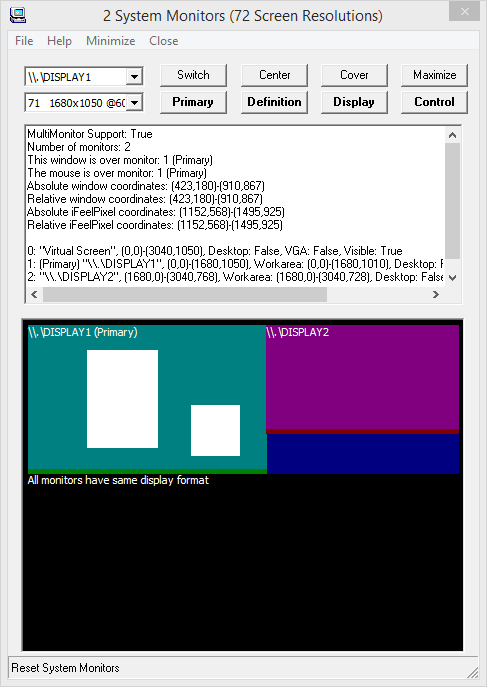
- System Monitors (Switch monitors, Set Primary Monitor, Change Screen
Definition) (v.2.5.0)
- Individual Joystick Button selection for vibration (v.2.4.5)
- Compatible with new SteelSeries Rival 710 Gaming Mouse (v.2.4.3)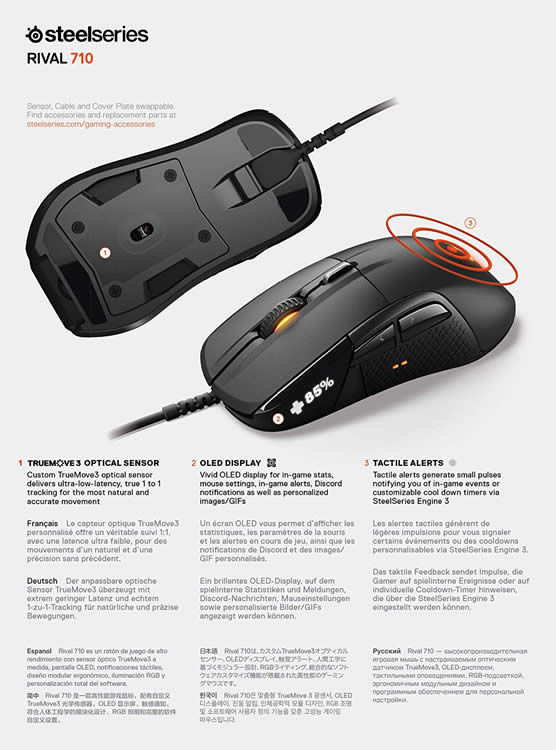
- TouchSound Multimedia, Task Monitor and Keyboard Piano compatible with TouchSense Technology (v.2.4.3)
- Fast Edge Detection for Cairo Image Surfaces (v.2.3.4)
- File > TouchSound MultiMedia (Audio Haptic output Analysis) (v.2.3.0)
- Collision Detection for Virtual Reality, Video Game, Media Player, Invisible cursor (v.2.1.7)
- Multimodal multisensory interactions interfaces (Pro feature) (v.2.1.6)
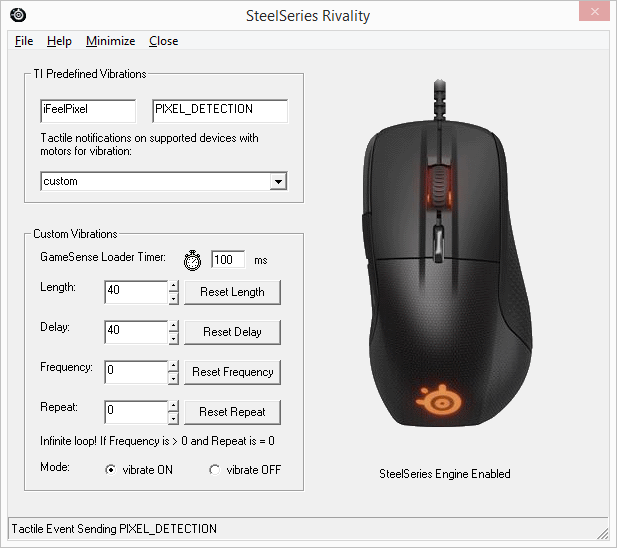
- SteelSeries Rivality: Tactile Alerts for Desktop (v.2.0.0) and for Windows (v.2.1.2)
The mouse is no longer merely an input device; desktop users can now feel Tactile Alerts, aiding them in decision-making.
Customize every aspect of the alerts from intensity to vibration patterns. SteelSeries Application Engine must be installed for SteelSeries Rival 500/700 Gaming mouse to enable tactile alerts
Open iFeelPixel interface > Options >> SteelSeries Rivality
- Windows 10 Compatible with Full Force Feedback enabled (Novint Falcon drivers) (v.1.9.0)
- Augmented Operating System notification service via cursor State (v.1.9.0)
- HyperTouch: HyperLink Detection for browsers / Custom Cursor Detector (v.1.9.0)
- Windows 8 Compatible! New setup includes a Desktop composition disabler (v.1.8.1)
- New multimodal file menubar
I. Visual Force Feedback (To enable pseudo-haptic effects with a simple mouse, Optical illusion)
II. Haptic feedback is divided into 4 parts:
1. Tactile Alerts (Custom/Predefined vibrations for SteelSeries Rival 500/700 mouse)
2. Rumble Feedback (To enable Rumble effects for Nintendo Wiimote).
3. Vibro-Tactile Feedback (To enable Vibro-Tactile effects for Tactile Mobiles).
4. Tactile Feedback (To enable Tactile effects for TouchSense devices).
5. Force Feedback (To enable force effects for Novint Falcon).
III. Auditory Feedback is divided into 3 parts:
1. Sound Card Feedback
2. Internal Speakers
3. Narrator Voices
Multi-modal feedback including the sensation of touch proved to significantly increase speed and reduce error rates.
2.
Updated Options
- Windows Themes: Set X/Y display scale percentage textbox added (v.4.0.0)
- Windows Themes: Menu File > Use default buttons (v.4.0.0)
- Windows Themes: Menu File > Save display scale (v.4.0.0)
- Windows Themes: Menu File > Disable Toolbar Buttons (Loading) (v.4.0.0)
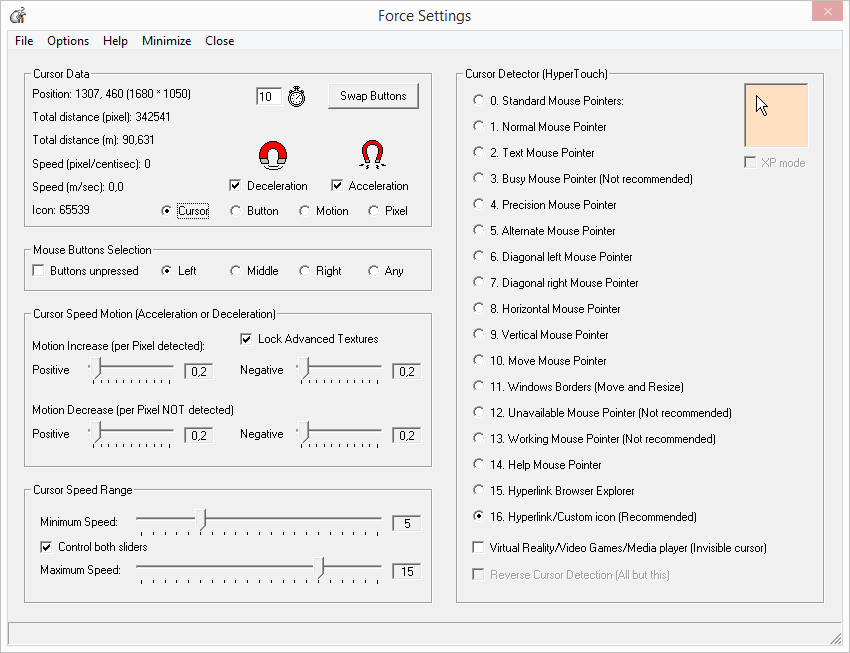
- Force Settings: Click the Position label to modify display scaling (v.4.0.0)
- MultiScreen: Menu File > Update Screen Definition (Automatic) (v.4.0.0)
- MultiScreen: reset to primary monitor if secondary monitor is not used (v.4.0.0)
- Zone restriction updated for 4K screens (v.4.0.0)
- Force Settings: Click Timer to Pause/Resume/Reset Main Timer (v.3.1.0)
- Novint Falcon: Click Timer to Pause/Resume/Reset Falcon Timer (v.3.1.0)
- Enable Pixel Detection can switch back to previous detect method (v.3.1.0)
- TouchSound: Click Timer to Pause/Resume/Reset TouchSound Timer (v.3.1.0)
- TouchSound: Haptic Delay Audio from 0 to 300 milliseconds (v.3.1.0)
- TouchSound: Playing is stopped if iFeelPixel is not started (v.3.1.0)
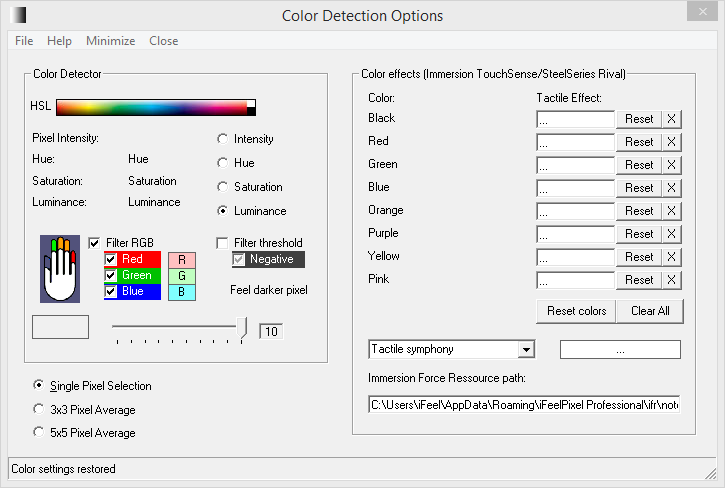
- Color Detection: 2*2 Pixel Detected Average (Fast) (v.3.1.0)
- Color Detection: 4*4 Pixel Detected Average (Slower) (v.3.1.0)
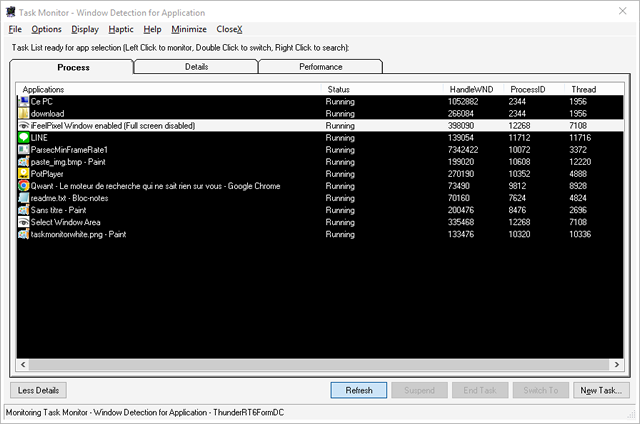
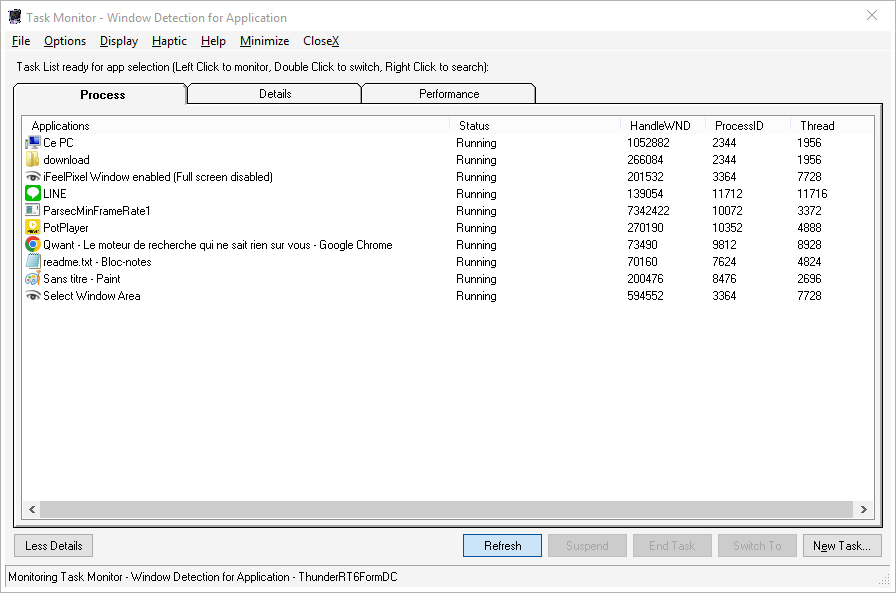
- Task Monitor: File > Suspend/Resume Thread/Execute a new task (v.3.1.0)
-
Task Monitor: Display > Process Status (Checked by default) (v.3.1.0)
- Task Monitor: Display > Tool Windows (Haptic Tooltip) (v.3.1.0)
- Task Monitor: Display > Buttons Visible (v.3.1.0)
- Task Monitor: Display > Standard/Flat ScrollBar (v.3.1.0)
- Task Monitor: Display > All Windows Executables (v.3.1.0)
- Task Monitor: Right Click > Define Priority > Low/Normal/High (v.3.1.0)
- Task Monitor: Right Click > Location/Details/Search/Properties (v.3.1.0)
- New Buttons: Details/Refresh/Suspend/Resume/End/Switch/New Task (v.3.1.0)
- SkinFramework updated to Version 20.3.0 (v.3.1.0)
- Windows 10 Theme improved (v.3.1.0)
- Threshold reset if value is Maxed out (Import/Export Settings) (v.3.1.0)
- Window Area updated with new buttons (v.3.0.1)
- Task Monitor: File > Terminate Process (v.3.0.0)
- View > System Tray > Control Panel + Taskbar (v.3.0.0)
- Force Settings: Audio Detection Method for TouchSound Multimedia (v.2.9.1)
- Force Settings: TouchSound compatible with Cursor Detector (v.2.9.1)
- Force Settings: Reset Cursor Settings if Detection Method changed (v.2.9.1)
- Force Settings: New border style for Attraction/Repulsion Magnets (v.2.9.1)
- Force Settings: Help > Mouse Input Performance Tests (v.2.9.1)
- TouchSound: Auto Level Slider improved (set a basic treshold) (v.2.9.1)
- TouchSound: File > Show Auto Level Animations (may increase CPU) (v.2.9.1)
- TouchSound: Options > Game Haptics Router (v.2.9.1)
- TouchSound: Click Timer image to Pause/Resume Audio (v.2.9.1)
- TouchSound: Click Device number to Open Audio Devices (v.2.9.1)
- TouchSound: Click Selection range number to Reset it to 0 (v.2.9.1)
- TouchSound: Click Audio Level percent to Reset it to 10 (v.2.9.1)
-TouchSound: Click Audio Frequency percent to Reset it to 50 (v.2.9.1)
- Force Settings: Cursor Stay Position (Beta feature) (v.2.9.0)
- Force Settings: Show Cursor Position button added (v.2.9.0)
- Force Settings: Cursor Scanner in continue optimized (v.2.9.0)
- Force Settings: Custom Cursors button updated (v.2.9.0)
- Force Settings > File > Mouse Acceleration > Speed Registry Key (v.2.9.0)
- Force Resource > Picture Files > Play/Stop (Open/Explore file) (v.2.9.0)
- Force Resource > File > Haptic Effects > License Registry Key (v.2.9.0)
- Force Resource > File > Windows Explorer > Explore File/Folder (v.2.9.0)
- TouchSound: Audio Level slider improved (v.2.9.0)
- TouchSound: Audio Level Min. set to 2% (was O%) (v.2.9.0)
- TouchSound: Audio Frequency slider improved (v.2.9.0)
- TouchSound: Automatic Frequency checkbox removed (v.2.9.0)
- TouchSound: Automatic Audio Level feature (v.2.8.8)
- TouchSound: Automatic Audio Frequency feature (v.2.8.8)
- Novint Falcon: Help and Support > Falcon Logs > Show/Hide (v.2.8.8)
- iFeelPixel: Threshold max value set to 250 (was 255) (v.2.8.8)
- iFeelPixel: View > Keep Display Zoom (v.2.8.8)
- Color Detection: "Filter treshold" inverts Zoom colors (v.2.8.8)
- Rivality: File > Tactile Event > Disable Tactile Menu (v.2.8.8)
- TouchSound: Audio Level and Audio Frequency both set to 50 (was 80) (v.2.8.7)
- Windows Themes: Skin Framework v20 update (interaction UxTheme.dll) (v.2.8.7)
- Metronome: Tempo and Tone minimum value set to 10 (was 50) (v.2.8.6)
- Advanced Toolbar Control updated (v.2.8.6)
- View > Main Display > Disable Toolbar Buttons (Loading) (v.2.8.6)
- File > Window Area > Settings | Catch Tools | Capture Image (v.2.8.6)
- Task Monitor: Process tab is selected by default (v.2.8.6)
- TouchSound: Apply selected visual theme at start-up (v.2.8.6)
- TouchSound: Green BackColor for Sound Ranges (Bass, Mid, High) (v.2.8.6)
- Keyboard Piano: Switch OS compatibility 64 bits to 32 bits (v.2.8.5)
- Force Settings: Correct Cursor Position (Numbers: 0 to Screen Width/Heigth) (v.2.8.4)
- Keyboard Piano: Improved OS compatibility (32/64 bits) (v.2.8.4)
- Keyboard Piano: Active Window Caption (v.2.8.4)
- Force Resource > Picture Files: Zoom Size and File Size moved up (v.2.8.4)
- Windows Themes: Skin Framework for ActiveX v19.3 licensed by Codejock (v.2.8.4)
- Detect FALCON HAPTIC (HID) connected (v.2.8.4)
- Strength Slider large change set to 1 (v.2.7.8)
- Grid: Scroll bar added for adjust Space X/Y/Z value (v.2.7.8)
- Grid: Space X/Y/Z default value set to 10 (v.2.7.8)
- Grid: Space Auto Settings based on zoom size (v.2.7.8)
- Grid: Auditory Feedback accuracy enhanced (v.2.7.8)
- Grid: File > Reverse Space Zoom, Window Detector, Monitor Selection (v.2.7.8)
- Grid: Options > Force Settings, Sound Keyboard, SteelSeries Rivality (v.2.7.8)
- Enable Haptic Clipboard checkbox added (v.2.7.8)
- TouchSound Multimedia initial position is centered on the screen (v.2.7.8)
- Task Monitor: Performance Processor (CPU) integrated (v.2.7.7)
- Task Monitor: Haptic > Disable above 95% CPU (v.2.7.7)
- Task Monitor: Display > Refresh Frequency > High/Above Normal/Normal/Below Normal/Low/Suspended (v.2.7.7)
- Task Monitor: Display > Black Graphic (v.2.7.7)
- Task Monitor: Options menu added (v.2.7.7)
- TouchSound: Options menu added (v.2.7.7)
- Menu/Start Button + RB: Enable/Disable Joystick To Mouse Emulator (v.2.7.5)
- Back/Select Button + LB: Enable/Disable Tactile Alerts on Xinput/Dinput
Devices (v.2.7.5)
- Left Stick Button + LB: JoyMouse Inverse XY-Axis (v.2.7.5)
- Right Stick Button + RB: JoyMouse Inverse RU-Axis [Xinput] or RZ-Axis [Dinput] (v.2.7.5)
- TONAR: Disable Joystick to Mouse emulator if Joystick ID changes (v.2.7.4)
- TONAR: File > Show Xinput Device Data (v.2.7.4)
- TONAR Joystick Data: "Rumble Triggers" checkbox added (v.2.7.3)
- TONAR Duration/Speed mini-scrollbars added (v.2.7.3)
- View > Main Display > Windows Themes (Opacity) (v.2.7.3)
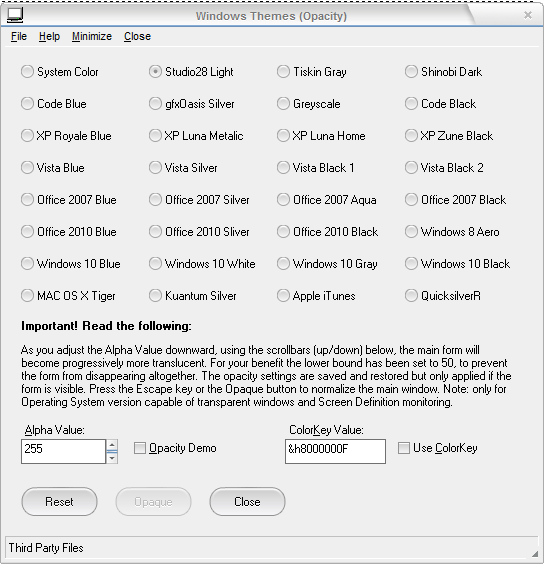
- Themes Instructions:
File > Download Visual Styles Package.
File > Extract Visual Styles in App Data Folder.
Select your favorite Windows Theme.
Click 'System Color' to reset Windows Theme.
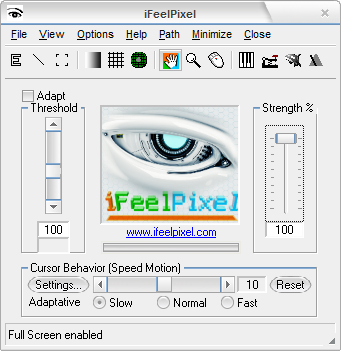
- About Windows Themes:
Studio28 Visual Styles made by Deviant Artist: Javier Rocasio
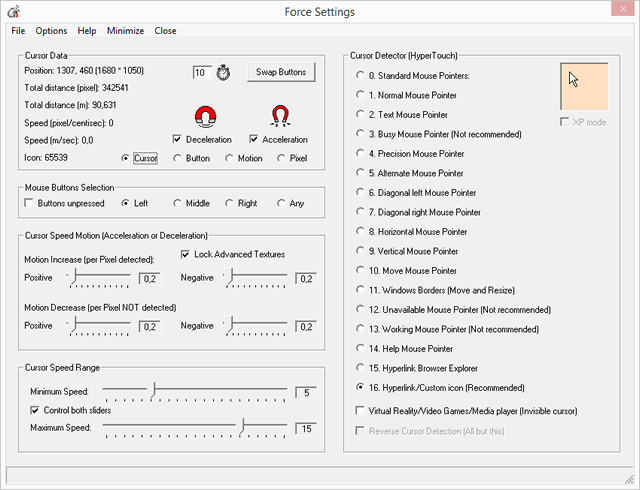
- Collision Detection for VR apps/Video Games (Fully Enabled for PRO edition/Time Limitation for Donation version) (v.2.7.2)
- Force Settings > Mouse Buttons Selection (v.2.7.1) [Special Thanks to Amir for this idea]
- Force Settings > File > Controller Settings (v.2.7.2)
- Force Settings > File > System Tray > Hide iFeelPixel Icon (v.2.7.2)
- Force Settings > File > System Tray > Taskbar Settings (v.2.7.2)
- Force Settings > Options > Show/Hide iFeelPixel (v.2.7.2)
- Icon Systray > Cursor Detector > Precision Mouse Pointer (v.2.7.2)
- Icon Systray > Cursor Detector > Reverse Cursor Detector (v.2.7.2)
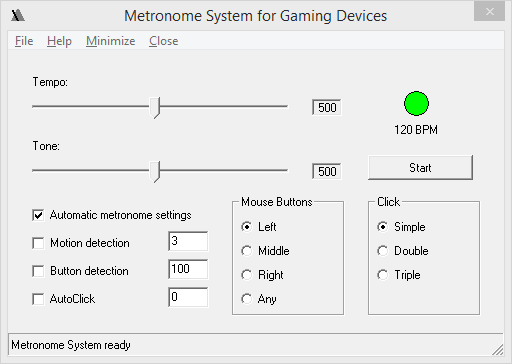
- Metronome System renamed to "Metronome System for Gaming Devices" (v.2.7.2)
- Save/Restore Textbox value in Metronome Settings (v.2.7.2)
- Metronome Delay value set to 100 ms by default (v.2.7.2)
- Metronome > Delay added to simulate automatic weapons in video games (v.2.7.1)
- Metronome > Tone and Tempo minimum value set to 50 (v.2.7.1)
- Metronome > Simulate Triple Click (v.2.7.1)
- Force Settings: Reverse Cursor Detection checkbox added (v.2.7.0)
- Window Area: Capture Image > "Save To File | Open File" with Edge Detection visualizer (v.2.7.0)
-TONAR updated for Motion Detection (v.2.7.0)
- Metronome updated for Cursor/Button/Motion/Pixel Detection (v.2.7.0)
- Task Monitor: Monitor Executable (Details tab) (v.2.6.9)
- Task Monitor: File > Reverse Selection (Detect All but This) (v.2.6.9)
- Task Monitor: The task list freezes during mouse-over for easy clicking. To stop the task list from freezing move your mouse away from the task list (v.2.6.9)
- SteelSeries Rivality: if SteelSeries Engine is not installed/detected then Open
Mouse Properties (v.2.6.8)
- TONAR: if reWASD remapper is not installed/detected then Open Controller
Settings (v.2.6.8)
- TONAR: Busy Mouse Pointer infinite loading fixed (v.2.6.8)
- TONAR: Speed of Effect changed from 500ms to 1000ms (v.2.6.7)
- TONAR: if a Window is detected, Horizontal and/or Vertical become Red (v.2.6.7)
- TONAR > File: Show Radar Animation (v.2.6.7)
- TONAR > File: Game Haptics Router (v.2.6.7)
- TONAR > File: Gamepad Profiler (reWASD required) (v.2.6.7)
- TONAR > Help: reWASD remapper link added (v.2.6.7)
- SteelSeries > File: Game Haptics Router (v.2.6.7)
- SteelSeries > Help: Update Intiface GHR (v.2.6.7)
- Force Resource: if Gamepad profiler is not detected then open Joystick Data (v.2.6.7)
- Gamepad Profiler (Detect Logitech Profiler or launch Joystick Data) (v.2.6.5)
- Immersion Foundation Classes version added in Immersion Force Resource (v.2.6.2)
- DirectX version added in Immersion Force Resource (v.2.6.2)
- Audiomass Sound Editor added in Force Resource (v.2.6.2)
- New Image File Type supported: PNG (Transparent Background) (v.2.6.0)
- Force Resource > Visual Library > PNG Load Options (v.2.6.0)
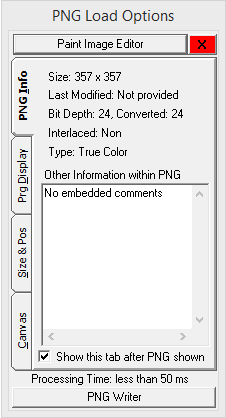
- Force Resource > Visual Library > Paint Image Editor (v.2.6.0)
- Zoom Checkbox added (Resize automatically Image) (v.2.6.0)
- Full Pixel Detection (Warning: CPU intensive!) added in Force Settings (v.2.5.0)
- Magnitude Modificator (Strength Multiplier) updated in Texture Setting (v.2.5.0)
- Double Texture Level (eg. Feel Magnitude only between 10 and 9999) (v.2.5.0)
- Minimum Texture Level (Range: 0 to 9999, recommended: 10 to 100) (v.2.5.0)
- Maximum Texture Level (Range: 0 to 9999) (v.2.5.0)
- Loading and Saving individual Texture Presets updated (v.2.5.0)
- Restricted zone updated (v.2.5.0)
- Capture Tools (Snipping Tool) added in Window Area (v.2.5.0)
- Capture Image (Screen Shot) supports Multiple Screens (Pro Version) (v.2.5.0)
- SteelSeries Rivality > Application Engine > Stop Application briefly (v.2.4.7)
- Audio Haptic Level Slider updated (Use the arrow keys to increment the
value: Left, Right, Down, Up) (v.2.4.6)
- Message box updated to save Pro License (v.2.4.6)
- VR mode become a Professional feature (File > Force Settings) (v.2.4.5)
- Grid Generation updated: Space connected only to Zoom size (Automatic settings) (v.2.4.5)
- Force Settings > Swap Buttons Status (normal, swapped, pressed, unpressed) (v.2.4.5)
- Click "Hue Color Systems" to open "Advanced Color Detector" (Pro Version) (v.2.4.5)
- Version History Tab added in About iFeelPixel (v.2.4.5)
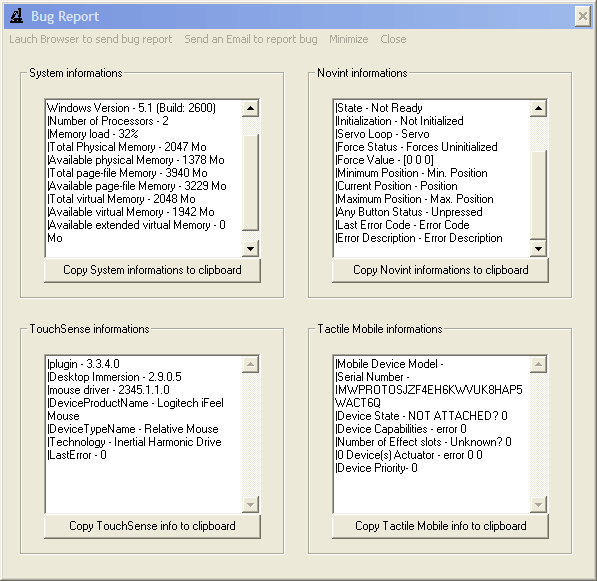
- CPU/GPU Processor information added in Bug Report (v.2.4.5)
-Full report Tab added in Bug Report (v.2.4.5)
- Keep image/audio filter even if folder is changed (example: "*.mp3" instead of "Media Files") (v.2.4.4)
- File > Force Resource >> Immersion / Media Files / Picture Files (v.2.4.3)
- Immersion Force Ressource > Haptic Effects >> Reload Plugin / Enable All Effects (or apply effect filter) / Stop all effects / Logitech Profiler (or click Logitech Gamepad) (v.2.4.3)
- "App Data folder", "Image File Types", and "About Immersion" added in Force Resource (v.2.4.3)
- "DirectX Diagnostic Tool" added in Force Resource and Bug Report (v.2.4.3)
- "Mouse properties" added in Force Resource and SteelSeries Rivality (v.2.4.3)
- "Remote control" media files (Play/Stop/Pause/Resume) (v.2.4.3)
- "Auto Repeat" and "Auto Play Next" media (v.2.4.3)
- "Controller Settings" added in TouchSound Multimedia (v.2.4.3)
- "Narrator Options" renamed to "Narrator Language" (v.2.4.3)
- "Language Translator" moved to "Narrator Language" help (v.2.4.3)
- Demo images added in Edge Detection options (v.2.3.4)
- Menu options updated ("Online description" replaced by "Feature Description") (v.2.3.4)
- Search WiinUpro and Joycons connection help added in WiiFeelPixel options (v.2.3.4)
- Tactile Feedback updated (TouchSense compatible with device driver vJoy) (v.2.3.2)
- Force Ressource > TouchSound Equalizer (v.2.3.0)
- Force Ressource > new checkbox "Automatic" (Link Visual Force Feedback with Sound playback speed) (v.2.3.0)
- Force Ressource > Double Click to open a file with media player or image viewer (v.2.3.0)
- Options Windows are correctly restored to normal if they are minimized (v.2.3.0)
- "Force Resource" choose the right extension when Image, Picture, Video or Music folder is selected (v.2.2.1)
- "Force Resource" automatically and randomly loads an image if there is more than one in folder (v.2.2.1)
- Load local image when user click the picture file and File path added (v.2.2.1)
- Grid with Motion detection updated for Audio features and Falcon devices (v.2.2.0)
- HyperTouch Cursor speed range based on Grid strength and saturation settings (v.2.1.8)
- Motion Detection added for Grid Generation Options (v.2.1.8)
- HyperTouch improved for the Falcon 3D Haptic device (v.2.1.7)
- HyperTouch added for Visual Feedback, Sound Feedback & Internal Speakers (v.2.1.7)
-
HyperTouch enhanced for the Window Area and Task Monitor (v.2.1.7)
-
HyperTouch updated for the Falcon 3D Robotic device (v.2.1.6)
-
Task Monitor updated for the Falcon 3D Haptic device (v.2.1.6)
-
"Reverse Space" added in Grid Generation Options (v.2.1.6)
-
"Tactile Notes" and "Color Options" added in Keyboard Piano (v.2.1.5)
-
Immersion Fundation Classes updated to v2.3.6 (v.2.1.5)
-
"Mouse limitation" renamed to "Zone Restriction" (v.2.1.5)
-
Transparent windows for "Zone Restriction" (v.2.1.5)
-
Task Monitor > File > Background Monitoring [Enable/Disable] (v.2.1.4)
-
Task Monitor > Display > Child Windows [Enable/Disable] (v.2.1.4)
-
Window Detection: Haptic when Window is shown, closed, minimized or maximized (v.2.1.3)
-
Load Picture Files (File > Force Resource) (v.2.1.3)
-
Window Detection for Application added in Pixel Detection feature (v.2.1.2)
-
"Cursor Detection", "Button Detection" and "Motion detection" features added in Force Settings (v.2.1.1)
-
"Pixel Detection" feature moved to Icon Systray (v.2.1.1)
-
Error Handler for GameSense developer added (v.2.0.5)
-
SteelSeries Rivality Options updated: "Mode Vibrate" ON / OFF (v.2.0.4)
-
Tactile Clipboard (v.2.0.1)
-
TextBox and button "Use Keyboard" added in "Keyboard Piano" (v.2.0.0)
-
TONAR and "Mouse Limitation" are compatible with "Boutons detection" (v.1.7.1)
- New Color options: Single pixel selection, 3*3 pixel average, 5*5 pixel average (v.1.7.0)
- Remote control the Falcon with the mouse (New Feature in TONAR settings) (v.1.6.3)
- Menu added in metronome settings: Monitor Selection, Sound Keyboard (v.1.6.2)
- Metronome Settings updated: AutoClick feature, Cursor Motion Detection, New sounds feedback (v.1.6.1)
- Force Settings updated with "Mouse Acceleration" (registry keys to disable or enable cursor acceleration on windows) (v.1.5.3)
- Force Settings Speed informations updated: Centisecond is replaced by second (v.1.5.3)
- Grid Options: weight simulator allows to simulate the weight of an object (icons, windows) if any button is pressed (v.1.5.0)
- Texture Options: New Texture Detectors to extract texture features (v.1.4.4)
- Texture Options: Magnitude Amplificator Slider updated (v.1.4.0)
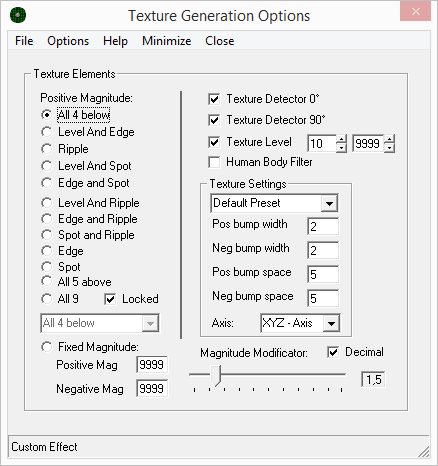
To unlock the Advanced Texture feature, the Professional edition of iFeelPixel TactileWare is required.
- We added the Z-axis in the Grip option and Texture option (Useful for 3D force feedback). (v.1.1.1)
- Edge Detection: Automatic or Manual Periodic effect (v.1.0.0)
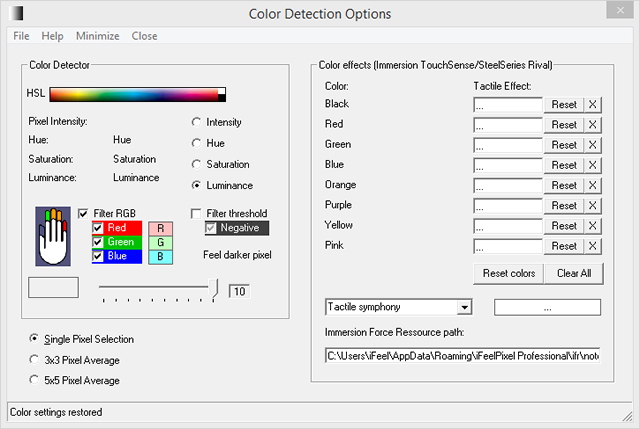
- Color Detection: Haptic Force (Novint Falcon) and Tactile Duration Slider added (v.1.0.0)
- Color Detection: User can select between 4 methods of color generation (Intensity, Hue, Saturation, Luminance v.1.2.3)
- Novint Falcon Options (v.1.5.3)
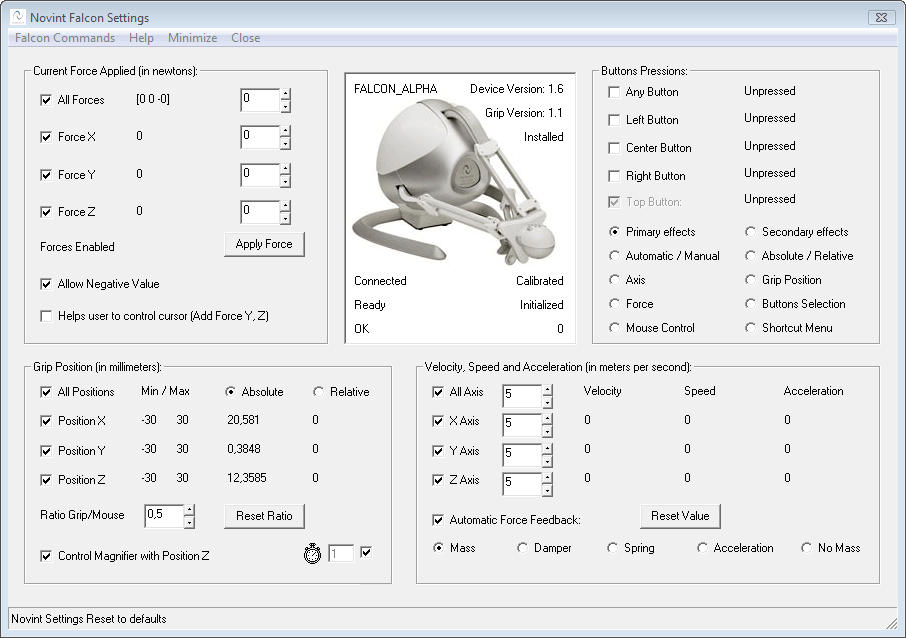
- Novint Falcon Settings Updated (See "Buttons Pressions" Tab).
- The latest F-gen/NVeNt/HDAL is recommended and should be installed on your machine. The software can detect if the new Novint Driver is correctly installed on the machine. It runs even if latest HDAL files are not installed or missing.
- You can disable or enable gravity compensation directly from Novint Falcon Options.
- This version is fixing some issues between the cursor accuracy and Z-axis. Thus, Tactile sensations have been improved.
- The default force settings have been modified. We recommend to reset settings to default if you installed a previous version on your machine. (v.1.5.0)
- The following features: Edge detection, Color detector, Tactile Grid, Texture generation and TONAR (windows attraction) have been updated and improved. The new tactile grid can be useful if others features cannot detect any pixel of interest (For example: overlay video).
- By default, all Novint buttons will not generate force feedback if a pression is detected (v.1.2.3)
- The user can choose between absolute grip position or relative grip position (Relative position is useful to know the grip direction).
The Novint Algorithm developed for iFeelPixel software is based on the
Novint HDAL Programmer's Guide about Newton's second law and how to
generate automatically force feedback effects (mass, mass-damper,
spring-mass-damper and mass-acceleration).
It gives pretty good results and the mass effect is customizable by the
user in every option. Thus, the buttons pressions are useful for
drag-and-drop operation on screen. The usability has been improved
and more people (blind and gamers) could be interested.
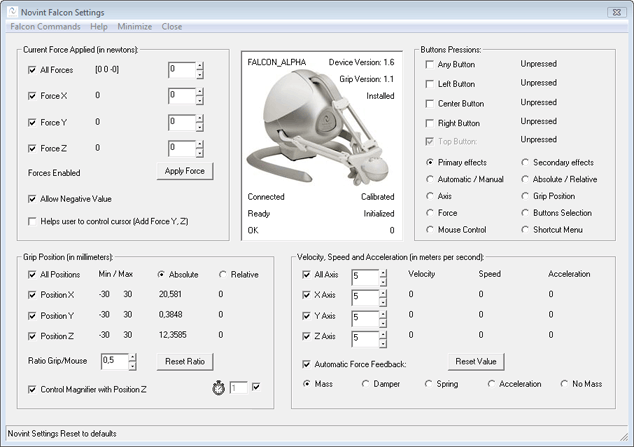
Falcon Commands:
- Uninitialize Falcon
- Initialize Falcon
-
Control Mouse
- Gravity Compensation
- Clear Forces
- Force Settings
- Reset Falcon Settings
-
The software automatically set the Falcon to control the mouse upon launch.
- New Automatic Force Feedback Checkbox:
Checked = the Force is automatically generated by the velocity or acceleration (Recommended)
Unchecked = Manual Force.
Selection choices: mass, mass-damper, spring-mass-damper or mass-acceleration.
Mass is the quantity of inertia possessed by an object or the proportion between force and acceleration refered to in Newton's second law of Motion.
The force feedback is more consistent when "Mass" is selected. The others algorythms are based on the Grip speed value. If the speed is more than 0, the force is increased.
The force settings can be adjusted on the "Force settings" window, "Novint Falcon settings" window, feature options or strength slider.
- You can control Zoom Magnifier with Z-axis of the Novint Falcon
+ Possibility to disable/enable every axis (every axis can have his own Mass/Force).
+ Possibility to disable/enable every position.
+ Possibility to disable/enable every button.
- Use Novint Falcon 'Top Button' to:
+ Switch between Attraction, Normal, Repulsion (Primary effects).
+ Disable\Enable Mouse control
+ Switch between Mass, Damper, Spring and Acceleration (Secondary effects)
+ Show Shortcut Menu
Help:
- Falcon Army (Novint Falcon Community), Haptic Gaming (3D Touch Games),
Novint Falconers (Steam Group)
- Novint Advanced Product Group:
Novint’s Advanced Products Group is building on Novint’s early success in the games market to build applications involving user interaction with 3D computer data, models or environments in other markets including medical & military simulation & training, simulation/visualization, geoscientific, architecture/design, automotive, and telerobotics.
The Value of Haptics
* Improved productivity & efficiency
* Engaging environment increases skill retention
* Improved interpretation and decision making
* Versatility & reconfigurability maximizes cost effectiveness
- Novint Falcon Hardware Requirement:
You need a Novint Falcon to feel the Force Feedback with iFeelPixel.
- Novint Falcon Software Requirement:
You need to download and install Novint Falcon F-Gen drivers.
- The software can detect if the Novint Driver is correctly installed on
the machine.
- Novint Falcon Calibration:
When starting this software, the Falcon shows a red light, which means that the controller is initiated but has not been calibrated. It does this each time a software is started. To calibrate: Push the handle as far as you can inwards towards the light display with the Novint logo. Pull the handle straight out against you. Repeat until the Novint logo turns blue.
- Novint Falcon FAQs
- Novint Falcon Support
Special thanks to Novint (Bill Anderson, Tom Anderson, Jonathan Miller, Christopher McGeorge, John Tsoupanarias) for the Novint Hardware and the haptic library.
- TONAR updated: cursor is attracted by windows, user can select any window size (v.1.2.3)
- TONAR direction detection optimized. This is useful to know the direction of the cursor (Horizontal: Right or Left, Vertical: Up or Down). This is also useful for Grid, Texture and visual force feedback. (v.1.0.0)
3.
New Options
- License registration updated with new product ID (v.3.0.1)
- File > Force Resource > Image Extractor (Edge detection) (v.2.8.6)
- Support for Email Alias in Help > About License (v.2.4.5)
- License is bonded to Email address instead of full name (v.2.4.4)
- New license system: Help > About iFeelPixel License (v.2.4.3)
- You need to Allow/Unlock "AccelSwitch" in your Firewall/Antivirus settings (v.2.1.9)
- Mouse Acceleration Switch ON/OFF/Toggle (v.2.1.8)
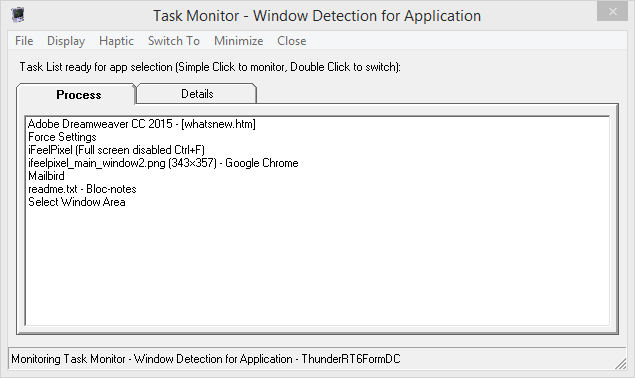
- Task Monitor (File > Monitor Selection) (v.2.1.3)
- Allow Multiple App Instances (File > Run at Start-up, Pro feature) (v.2.1.3)
- Task Monitor (Simulate Windows List Switcher) (v.2.1.2)
- Allow Multiple App Instances (File > Run at Startup, Pro feature) (v.2.1.1)
- MultiScreen Definition (Pro feature) (v.2.0.9)
- View > MultiScreen Definition >> Half Horizontal/Vertical (v.2.0.0)
- Screen definition detection (v.1.7.0)
- Multiple Monitors (Virtual Desktop) support (v.1.7.0)
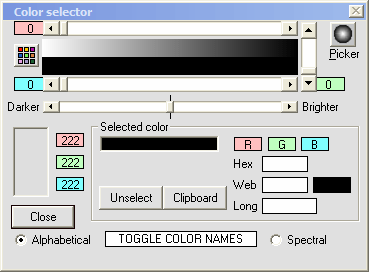
- Advanced Color Selector for the professional version (v.1.2.3)
4.
Optimizations
- Detect Ultimate Window, if parent window not detected (v.4.0.0)
- Extra Icon systray is cleared, if explorer is restarted (v.4.0.0)
- Timers buttons borderstyle added (v.4.0.0)
- Optimize: HyperTouch/Edge/Line/Corner/Texture faster features (v.2.9.1)
- SteelSeries Rivality > Haptic Mouse > SteelSeries Engine (v.2.9.0)
- SteelSeries Rivality > SteelSeries Service > Start/Stop Update (v.2.9.0)
- SteelSeries Server response time optimized (v.2.9.0)
- SteelSeries Engine/GG encrypted address updated (coreProps.json) (v.2.9.0)
- Metronome Button Detection optimized (Does not hang App) (v.2.9.0)
- Morse Engine optimized (Use less CPU) (v.2.9.0)
- Window Tools Pro: Ultimate Parent Window fully implemented (v.2.9.0)
- Window Tools: Ultimate Parent Window Details (Pro) (v.2.8.8)
- Window Tools: Switch between Screen and Window Size (Pro) (v.2.8.8)
- Stability and Bug Fixes (v.2.8.7)
- Force Settings > File > Follow Screen Pointer (Direct access) (v.2.8.6)
- Hot Key: Show window caption when custom cursor is captured (v.2.8.6)
- Parsing improved for SteelSeries Engine/GG address (coreProps.json file) (v.2.8.5)
- Faster loading time, Virtualized required files, Splash screen disappears quickly (v.2.8.4)
- Custom Cursors Scanner (PRO edition only) (v.2.8.3)
- Global Hot Key to capture cursor value (PRO edition only) (v.2.8.3)
- Collision Detection for Video Games (PRO edition/Donation version) (v.2.8.3)
- Force Settings: Cursor Scanner algorithm improved (v.2.8.2)
- Force Settings: Cursor Detection enabled by default (v.2.8.2)
- Hyperlink/Custom icon enabled by default (v.2.8.2)
- Force Settings: Video Games, Virtual Reality, Media Player (Invisible cursor) (v.2.8.2)
- License registration updated for purchased hardware products (v.2.7.8)
- Loading status: Mouse Pointer (hourglass) for each window (v.2.7.8)
- TouchSound: Xinput Progressive Haptic Effects (Motor speed = Audio level) (v.2.7.6)
- TouchSound: File > Show Always Audio Channels (v.2.7.6)
- Xinput Haptic Effects improved (Color, Grid) (v.2.7.4)
- Tactile Effects improved for Xinput Devices (Keyboard, Morse, Metronome) (v.2.7.3)
- Morse Engine more responsive during Wait delay (v.2.7.3)
- Tactile Effects improved for Xinput Controllers (Edge, Texture generation) (v.2.7.1)
- Window Area: Window Detection optimized (v.2.6.9)
- Window Area: Settings > Automatic Invisiblity (improved) (v.2.6.9)
- Window Area: Settings > Hilite (Draws Window Rectangle on Desktop, Disabled by default) (v.2.6.9)
- Window Area: Capture Image > Screen Shot (Full Screen) / Window Snip (Selected Window) (v.2.6.9)
- Window Area: Capture Tools > System Monitors (v.2.6.9)
- Virtual file Xinput1_3.dll added (v.2.6.8)
- Area Selection optimized for multiple monitors (v.2.5.1)
- Capture Image improved for Area Selected (v.2.5.1)
- GameSense Server Discovery Improved (Update Address Port) (v.2.4.7)
- Deinitialized timer length increased (set to 60 seconds) (v.2.4.7)
- Application State (Keepalive event sent every 30 seconds) (v.2.4.7)
- GameSense Pause Interval updated (Range: 1-9999 ms) (v.2.4.6)
- VJoy Driver Detection can disable Tactile Feedback for TouchSense Devices (v.2.4.5)
- SteelSeries GameSense Loader Timer (Pause Interval in milliseconds, 100 ms by default) (v.2.4.5)
- VJoy Driver Detection can disable Tactile Feedback for TouchSense Devices (v.2.4.5)
- Haptic disabled for Clipboard and Task Monitor, if TouchSound is activated (v.2.4.5)
- Strength slider optimized for mousedown and scroll (v.2.4.5)
- Audio Haptic Level precision improved (slider 5% incrementation) (v.2.4.5)
- SteelSeries Engine Detection improved (Enabled/Disabled/Not Installed) (v.2.4.3)
- TONAR Joystick Data improved (Xinput/Dinput detection, Monitor Joystick, Automatic/Manual Timer) (v.2.4.3)
- TouchSense Devices Detection improved (Load compatible Haptic effects) (v.2.4.3)
- Stability and Bug fixes in Force Resource (v.2.4.3)
- Enhanced DoEvents Function (v.2.4.3)
- "LogitechSteeringWheel.dll" packed within iFeelPixel executable (v.2.4.3)
- Compressed files in iFeelPixel executable (v.2.3.4)
- TouchSound Multimedia optimized (v.2.3.3)
- Tactile Feedback (TouchSense) detection improved (v.2.3.3)
- TouchSound memory management improved (v.2.3.2)
- Stability and bug fixes (v.2.3.2)
- Start/Stop Cursor effect added in icon systray (v.2.3.1)
- Randomize algorithm improved (v.2.2.1)
- Hyperlinks switched from HTTP to HTTPS and establish a uniquely secure connection between yourself and the iFeelPixel website (v.2.2.1)
- Code Signing Certificate digitally signed with OpenSSL and counter-sign by Comodo (v.2.2.0)
- iFeelPixel website fully encrypted for safer browsing (v.2.1.9)
- Cursor scanner faster (v.2.1.8)
- Sliders optimized against crash (v.2.1.8)
- Code source optimized (<> replaced by Not =) (v.2.1.8)
- Force Settings > Block Mouse for Falcon (v.2.1.7)
- Force Settings > Hide Mouse for 5 seconds (v.2.1.7)
- SteelSeries Bindings Disabled for Grid effect when Magnifier is enabled (v.2.1.6)
- "Keep Center Screen" for "Window Area" (v.2.1.5)
- Searching WiinRemote" improved in WiiFeelPixel (v.2.1.5)
- GameSense updated properly when user Reset Color Options (v.2.1.4)
- "Hyperlink browser pointer" added in Cursor Detector (v.2.1.3)
- "Center Primary Screen" and "Center MultiScreen" (v.2.1.2)
- Stability and bug fixes (v.2.1.2)
- MultiScreen Definition optimized for any Display setup (Pro feature) (v.2.1.0)
- SplashScreen loading improved (v.2.0.8)
- Cursor Detection enhanced (v.2.0.7)
- Immersion Web ActiveX EULA automatically closes more quickly at loading (10x faster) (v.2.0.6)
- Terminate Executable on Exit (v.2.0.6)
- Cursor Detection improved (v.2.0.5)
-
GameSense loading optimized (v.2.0.5)
- SplashScreen improved for Start-up (v.2.0.4)
-
Optimization to control SteelSeries Engine ("msxml3.dll" replaced by "msxml6.dll" for JSON data interchange) (v.2.0.3)
-
Multimodal updated to Enable/Disable Tactile Alerts (v.2.0.2)
- "SplashScreen" window always stay on top to make a list of available cursors (v.1.9.0)
- Timer Optimization (v.1.9.0)
- Stability and bug fixes (v.1.8.1)
- Desktop composition compatibility improved (v.1.7.0)
- Faster pixel detection (v.1.7.0)
- Cursor Motion detection (v.1.7.0)
- Mouse Boutons detection (v.1.7.0)
- Ready for International languages (v.1.6.1)
- Stability and bug fixes for international version (v.1.6.1)
- New feature: "Block Mouse" in "Force Settings" window (v.1.6.1)
- New software protector (v.1.6.0)
- Explorer crashes detection: if explorer crashes, the iFeelPixel Icon in Sistray appears again (v.1.6.0)
- "Stop all effects!" do not set anymore cursor behavior to normal speed (v.1.5.3)
- Option Button "No Mass" added in Falcon Settings to disable Force for secondary effects.
- Grab the status bar with left-button to move the form (v.1.5.1)
- TouchSense Plugin stability improved (v.1.5.0)
- Stability and bug fixes (v.1.4.6)
- The software automatically detects if the Falcon is calibrated (v.1.4.5)
- Novint Falcon Settings: if position Z is disabled, the zoom is not controled by Z-axis (v.1.4.4)
- Texture Options: Magnitude Amplificator Slider optimized for the Novint Falcon (v.1.4.4)
- Select window or area settings: "Automatic Invisiblity" after any selection (v.1.4.3)
- Memory leaks because virtualization are corrected (v.1.4.3)
- "Filter RGB" in Color Detection is not anymore checked if Edge Detector is activated (v.1.4.3)
- "Filter Threshold" in Color Detection is controled by the main Threshold (v.1.4.2)
- Zoom value Controled by Novint Falcon Z-axis is reversed (v.1.4.2)
- Tactile Grid effect optimized for Tactile Mobile (v.1.4.2)
- Start/Stop Immersion VibeTonz Service (v.1.4.2)
- Tactile Mobile effects cannot be edited if VibeTonz is reinitializing (v.1.4.2)
- View > Desktop Composition > Enable/Disable via command (v.1.4.1)
- We added 2 new type of sliders in the "Force Settings" windows.
These sliders allow to generate advanced textures sensations: Positive (Right or down directions) and Negative (Left or Up directions) (v.1.4.0)
To unlock the Advanced Texture feature, the Professional edition of iFeelPixel TactileWare is required.
- Advanced Texture Generation Algorythm improved (v.1.4.0)
- New setup executable automatically disables desktop composition and run as Admin (v.1.4.0)
- Stability and bug fixes (v.1.3.3)
- Interface optimized: Cursor Behavior added (User can determine the cursor speed) (v.1.3.3)
- Compatibility improved for windows 7 (Application virtualization made with Boxedapp packer, side-by-side feature) (v.1.3.3)
- Reduce Memory Usage (v.1.3.3)
- Window detector improved: "High precision" checkbox added. It works with HWND (v.1.2.5)
- We added a new slider in the "Force Settings" windows.
This slider allows the software to decrease (slowly or quickly) the force
when there is no pixel detected (v.1.2.3)
- Visual Force Feedback (Pseudo-haptic developed in collaboration with INRIA) motion is much more precise than before (decimal precision). (v.1.3.3)
That's mean iFeelPixel software can simulate realistic pseudo-tactile sensations without a haptic interface.
Open File Menu > Visual Force Feedback (keyboard shortcut: Ctrl+ F1)
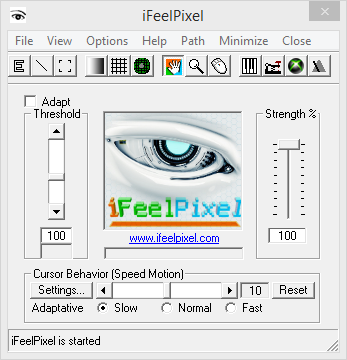 
Tactile Images: feeling the relief of images (View the Flash video)
5.
Others updates
- Self-Code Signing Certificate digitally signed by iFeelPixel Association (v.3.1.0)
- Texture: Options > Force Resource (v.2.9.1)
- Task Monitor > Run Registry Editor (v.2.9.0)
- Task Monitor > Display > File Properties (Details) (v.2.9.0)
- View > Main Display > Keep Display Zoom checked by default (v.2.9.0)
- About iFeelPixel > File > Properties (v.2.9.0)
- Multiple App Instances detection (Ask to End all apps) (v.2.9.0)
- Force Resource > Links > Download Lofelt Haptic Sound Assets (v.2.8.7)
- Help > Bug Report: Get OS/CPU bitness (v.2.8.5)
- Installer can update to the latest version of VCRedistx86.exe (v.2.8.4)
- Manual threshold value set to 90 (v.2.8.3)
- Task Monitor: show "Reverse Selection" details in status (v.2.8.3)
- Path > Cursor Detector > Collision Detection for Video Games (v.2.8.2)
- Help > Teamviewer replaced by "Parsec Remote App" (v.2.8.0)
- Metronome: File > DualFeel Gaming added (v.2.8.0)
- SteelSeries Rivality > Options menu added (v.2.8.0)
- Force Resource > Haptic Effects > Haptic Files Types > IFR files (v.2.8.0)
- Code Signing Certificate digitally signed by iFeelPixel Official President (v.2.8.0)
- Path/Icon Systray > Detection Methods > Pixel Detection for Screen (v.2.7.9)
- Path/Icon Systray > Detection Methods > Game Haptics Router (v.2.7.9)
- View > Desktop Composition > Disable Aero (updated) (v.2.7.7)
- Path/Icon Systray > Button Selection > Left/Middle/Right/Any (v.2.7.7)
- Path/Icon Systray > Cursor Detector > Help Mouse Pointer (v.2.7.7)
- TONAR: File > XBox icons (Deviantart: FBED, wangbin99, SlamItIcon) (v.2.7.4)
- TONAR: File > Control Panel (v.2.7.4)
- Metronome: Pixels/Delay/Beats/Click mini-scrollbars added (v.2.7.4)
- View > Desktop Compositions > Appearance Personalization (v.2.7.3)
- New Menu "Path" features shortcuts (v.2.7.3)
- Metronome System > Help > Metronome Tool (online link added) (v.2.7.3)
- View > Main Display > Remember Position (Save Left/Top properties) (v.2.7.2)
- View > System Tray > Hide iFeelPixel Icon (v.2.7.2)
- View > System Tray > Taskbar Settings (v.2.7.2)
- View > Optimize Memory > Performance Monitor (v.2.7.2)
- Help > Community Forum (Blog/Newsgroup removed) (v.2.7.2)
- Intiface Game Haptics Router bundled in iFeelPixel setup (v.2.7.0)
- TouchSound MultiMedia: File > Game Haptics Router (Launch fixed) (v.2.6.9)
- TouchSound MultiMedia > Help > Deezer Music Sample (Replace Qwant Music) (v.2.6.9)
- New Logo: Robotic Eye designed by bulldozer vfx (v.2.6.7)
- Shortcuts updated (v.2.5.0)
- File > Force Resource > Controller Settings | Control Panel (v.2.5.0)
- Force Settings > Help > How to Change Mouse Sensitivity (v.2.5.0)
- Set Focus correctly between some Textbox and some Slider (v.2.5.0)
- Link added for the Online code Morse Radio (v.2.4.6)
- "Reverse Space" renamed to "Reverse Space Zoom" (v.2.4.5)
- Immersion Force Resource renamed to "Force Resource" (v.2.4.5)
- TouchSound > Help > Qwant Music Sample (v.2.4.5)
- Task Monitor > File > Window Tools (v.2.4.5)
- File > Monitor Selection > Narrator Language (v.2.4.5)
- File > Controller Settings (v.2.4.5)
- View > CPU priority >> Task Manager (v.2.4.3)
- Cursor behavior > "Speed motion" replaced by "Cursor settings" (v.2.4.3)
- Cursor behavior > "Controller Settings" added (v.2.4.3)
- "Monitor Window Area" added in Task Monitor (v.2.4.3)
- "Privacy Data (GDPR)" added in About iFeelPixel (v.2.4.3)
- "Performance Monitor" added in Bug Report (v.2.4.3)
- "About iFeelPixel" added in Bug Report (v.2.4.3)
- Image controls converted to picture box in SteelSeries options (v.2.3.3)
- Error handler added in SteelSeries Options (v.2.3.3)
- Updated icon compatible with any Windows Operating System (v.2.3.2)
- File > Settings >> App Data Folder (v.2.3.0)
- New "redist" folder contains "vcredist_x86.exe" and "CDM v2.12.00 WHQL Certified.exe" files (v.2.3.0)
- "Backup.xml" file is not overwritten anymore by the installer (v.2.3.0)
- HyperTouch connected to TONAR for mouse directions and coordinates (v.2.2.1)
- HyperTouch effects are correctly detected even if Tactile Alerts are disabled (v.2.2.0)
- Background picture removed on iFeelPixel window (v.2.1.8)
- Splash screen improved quality (png) (v.2.1.8)
- Bigger icon app (64px) (v.2.1.8)
- Old iFeelPixel Stop logo concept without Robotic hand (v.2.1.7)
- New iFeelPixel logo concept with Robotic hand (v.2.1.6)
- "Keyboard Piano" Shorcut added in Icon Systray (v.2.1.6)
- "Morse Engine" Shorcut removed in Icon Systray (v.2.1.6)
- "Keyboard Properties" added in Keyboard Piano and Morse Engine (v.2.1.5)
- "Display Settings" and "Theme Settings" added in iFeelPixel (v.2.1.5)
- Device Manager" added in Force Settings and Bug Report (v.2.1.5)
- "Task Manager" added in Task Monitor (v.2.1.5)
- "Controller Settings" added in Force Ressource (v.2.1.5)
- "Regional settings" added in Narrator (v.2.1.5)
- "Application Manager" and "About Windows" added in About (v.2.1.5)
- "System Info" and "System properties" added in Bug Report (v.2.1.5)
- "Quit" button added in every Window Option (v.2.1.4)
- Ease of Access Center" added in Narrator (v.2.1.3)
- "Sound Options" added in Keyboard Piano (v.2.1.3)
- "Mouse Properties" added in Force Settings (v.2.1.3)
- iFeelPixel Logo and App Icon updated (v.2.1.2)
- Windows Virtual Keyboard link added (File > Keyboard Piano Options) (v.2.1.1)
- Windows Narrator link added (File > Narrator Options) (v.2.1.1)
- Windows Clipboard Viewer link added (File > Clipboards Monitoring) (v.2.1.1)
- New shortcuts for Pixel Detection, Cursor Behavior and Cursor Detection (v.2.0.6)
- Toolbar updated: image replaced in button "Play/Stop Pixel Detection" (v.2.0.4)
- "Monitor Selection" & "Pixel Detection" features are separated into 2 distinct groups (v.2.0.3)
-
"Cursor Detector" shortcut added in icon systray (v.2.0.3)
-
SteelSeries Rival 500/700 links updated (v.2.0.2)
- "About iFeelPixel" and SplashScreen updated with new SteelSeries Logo (v.2.0.1)
- "Bug Report" updated for SteelSeries Engine (v.2.0.0)
- File > Language >> Narrator Options/Online Translator (v.2.0.0)
- Outdated links corrected or replaced with Web Archive (v.2.0.0)
- "Monitoring selection" renamed to "Pixel Detection" (v.1.9.0)
- "Attract" renamed to "Slow", "Repel" renamed to "Fast" (v.1.9.0)
- Sliders reset to maximal value for Edge, Color, Grid and Texture features (v.1.9.0)
- Novint web site links updated (v.1.6.3)
- Installer updated: Default path is the "Application Data Folder" for the current user (v.1.6.2)
- Internet links updated in "Force Ressources" window (v.1.6.1)
- "Software updates" moved to help Menu (v.1.6.1)
- Registry keys added to disable or enable mouse acceleration (v.1.6.1)
- Button "Reset value" in Falcon Settings reset Mass/Force to value 5 (v.1.5.3)
- Registry keys folder added in setup (v.1.5.3)
- Uninstall icon updated (v.1.5.3)
- New icons for internet shortcuts (v.1.5.3)
- Splashscreen enhanced (v.1.5.3)
- "Swap buttons" added in "Force Settings" (v.1.5.0)
- Menu shortcut to "Force Settings" added in Edge, Color, Grid, Texture (v.1.4.5)
- "Exit" renamed to "Hide" in "mouse limitation" (v.1.4.5)
- Link updated for the immersion web page in help > about (v.1.4.5)
- Credits / EULA updated (v.1.4.5)
- "Check Software Updates" renamed to "Software Updates" (v.1.4.4)
- New link "Cursor Behavior Support" added in "Force Settings" help menu (v.1.4.3)
- "Speed and Force settings" renamed to "Force Settings" (v.1.4.2)
- "IVT size", "Max Nested repeats" and "Max Duraction effect" added in advanced Tactile Mobile Effects (v.1.4.2)
- "Show/Hide iFeelPixel" updated in icon sisytray (v.1.4.2)
- Delete Texture Preset (v.1.4.0)
- Icon Menu updated (v.1.3.3)
- Limited Zone Updated: unused buttons removed (v.1.3.3)
- "Force settings" menu updated with "Disable enhance pointer precision" (v.1.2.5), "Control Panel" (v.1.3.3) and "Texture Settings..." (v.1.4.0)
- The following features: Edge detection, color detection (color selector), tactile Grid, Texture generation and TONAR (windows attraction) have been updated and improved for Novint Falcon (Force Feedback Hardware). We added the Z-axis in the Grid option and Texture option. (v.1.2.3)
- Immersion Plugin agreement is automatically accepted (v.1.2.3)
- "TouchSense Information" updated (v.1.1.1)
- "Full screen" button added in "Limited Zone": switch between full screen or window (v.1.1.1)
- "Show shortcut Menu" Checkbox: Show icon Menu if the window is already selected (v.1.1.1)
- "Bug Report" updated for the Tactile Mobile (v.1.0.0)
- "Tactile Feedback" updated for Edge, line, corner, color detection (v.1.0.0)
- "Delete file settings" added (v.1.0.0)
- Visual Feedback renamed to "Visual Force Feedback" (v.1.0.0)
- "Clipboard viewer" moved to "clipboard window" (v.1.0.0)
- Volume Slider renamed to "Strength" slider (v.1.0.0)
-
Keyboards shortcuts updated
- Typo
and spelling corrected
- Help
and "Readme" updated
- Text
options updated
- Messages
box updated
- Status
bar updated
- Tooltip's
updated
- Links updated
- Toolbar updated
- "Splashscreen" updated with Novint Logo.
- Help > "About" updated with Novint Logo.
- "EULA / Credits" updated.
6.
Know issues
List of known issues in this version of iFeelPixel:
- MultiScreen: bug fixed for Virtual Screen size (incorrect width/height) (v.4.0.0)
- Fix TouchSound: Timer is not correctly controlled by main timer (v.4.0.0)
- Task Monitor: bug fixed between Process Details and Less Details (v.4.0.0)
- Window Area: bug fixed for the Window text (v.4.0.0)
- Fix: Image Extractor error (v.3.0.1)
- Fix: Texture Axis Listbox does not select the correct Axis (v.3.0.0)
- Fix: DualFeel Gaming Horizontal layout not correctly centered (v.2.9.1)
- Fix: Keyboard Piano Switch OS mouse button not correctly detected (v.2.9.1)
- Fix: TouchSound Auto Level is not detecting audio sound equal 100 (v.2.9.1)
- Fix: Metronome Motion Settings not correctly restored (v.2.9.0)
- Fix: Switch does not open Controller Settings or Gamepad profiler (v.2.9.0)
- Fix Menu issue (May move the current form) (v.2.8.8)
- Fix TouchSound Timer issue (Division by Zero) (v.2.8.8)
- Fix Metronome Motion Detection (reset Amount of Pixels) (v.2.8.8)
- Fix: Stop function issue when "Disable Toolbar Buttons" is activated (v.2.8.7)
- TouchSound: Fix "Always on Top" issue that bring back window (v.2.8.6)
- Fix Texture Options icon (v.2.8.5)
- Fix Novint Falcon Options is not opening (v.2.8.4)
- Fix Force Settings: Global Hot Key button may crash app (v.2.8.4)
- Fix XP Failed to load control 'ImageList' from MSCOMCTL.OCX (ICO files
replaced by GIF files)(v.2.8.4)
- Force Settings: Fix Cursor Detector XP mode status (v.2.8.2)
- Fix for SteelSeries GG encrypted server (coreProps.json) (v.2.8.1)
- Fix Restore settings for Main Strength and Constant Force (Edge detection) (v.2.8.0)
- Fix TouchSound: Settings are not correctly reseted if "Save settings on exit"
is disabled (v.2.7.8)
- Fix TouchSound: Windows Theme is not correctly applied (v.2.7.8)
- Fix Force Settings: Hyperlink/Custom icon (Cursor Detector) is not selected
by default if there is no backup file (v.2.7.8)
- TONAR: Fix Process increases on low-end machine if a Windows Theme is enabled (During Game Play, if CPU is overloaded, enable manualy System Color Theme) (v.2.7.7)
- TONAR: Fix Error when Grid Generation is enabled (object required) (v.2.7.7)
- Fix: Zoom value is not correctly updated (v.2.7.7)
- TONAR: Process increases on low-end machine if a Windows Theme is enabled (v.2.7.6)
- TONAR: Joystick to Mouse emulator fix for Xinput/Dinput (v.2.7.5)
- FIX: Infinite Vibration Duration in Xinput Mode (v.2.7.3)
- Bug fix: Multiple Icons created during gaming (v.2.7.2)
- Paint image editor corrected (v.2.6.6)
- FIX: a 64-bit process may crash (v.2.6.6)
- FIX: a 64-bit process may crash on loading a DLL (v.2.6.6)
- Registry bug fixes (v.2.6.5)
- Vibration Status corrected for Xinput/Dinput devices (v.2.6.4)
- Metronome does not Start/Stop correctly (fixed v.2.6.3)
- A process crashed on loading a DLL of a virtual file on Windows 10 version 2004 (fixed 2.6.2)
- Component "TABCTL32.OCX" is not correctly registered [system file missing] (fixed v.2.6.1)
- Full Screen Bug (fixed v.2.6.0)
- Bug fix when user moves TONAR options around the screen (fixed v.2.4.6)
- Force Resource bug: "Icon files are not compatible with Edge Detection Cairo Surfaces" (fixed v.2.4.4)
- Tactile Alerts are not working with Hyperlink Detection (fixed v.2.4.3)
- Current number of Audio devices and Sound card detection (v.2.3.1)
- Message "Couldn't open midi device" is only displayed in status (fixed v.2.3.1)
- "Invalid picture" error fixed if the file path is incomplete (fixed v.2.2.1)
- Vertical/Horizontal Direction in Grid Visual/Sound Settings fixed (fixed v.2.2.1)
- Save/Restore Checkboxes in Grid Visual/Sound Settings fixed (fixed v.2.2.1)
- Left and Top values fixed in "Windows Area" when iFeelPixel is not started (fixed v.2.2.0)
- Icon issue "Specify tool" in "Window Selection" (fixed v.2.1.9)
- Center Primary Screen when resetting (fixed v.2.1.8)
- Bug fixed for keyboard shortcut in Window Area (fixed v.2.1.7)
. Timer error fixed for Windows Detection (fixed v.2.1.3)
. Crash occurs when scrolling sliders. Solution: Disable sliders automaticaly (fixed v.2.1.2)
. "Keyboard Piano" keystrokes fixed for 64bits OS (fixed v.2.1.1)
. Proper End Process at Exit (fixed v.2.0.5)
. "Area Selection" corrected (fixed v.2.0.5)
. Component "ImmVibeAx.dll" is missing when Immersion VibeTonz Studio is not installed on the machine (fixed v.2.0.3)
. Due to the SteelSeries Engine limitation, there is no "Stop Game Event" or "Stop Tactile Effect" feature.
So, some haptic effects may continue to keep play, even if pixel detection feature is disabled (issue v.2.0.0)
. There is no Master Volume in the SteelSeries Engine but only predefined vibrations, so haptic strength can only manually set up (fixed v.2.0.0)
. Crash occurs when moving sliders. Solution: Disable sliders automaticaly (fixed v.2.0.0)
. Cannot detect cursor state on different Operating Systems (fixed v.1.9.0)
. Grid feature for Novint Falcon: Left and Middle buttons was inverted (fixed v.1.9.0)
. Open 2 browser tabs when user open a web page (fixed v.1.8.1)
. Slow pixel detector with modern video games (fixed v.1.7.0)
. It does not detect correctly screen definition updates (fixed v.1.7.0)
. It does not work with multiple monitors and virtual desktop (fixed v.1.7.0)
. Installer updated for standard users without admin rights (fixed v.1.6.1)
. "Stop all effects!" set cursor behavior to normal speed (fixed v.1.5.3)
. Button "Reset value" in Falcon Settings reset Mass/Force to old value 2 (fixed v.1.5.3)
. Morse is not working correctly if another feature is activated (fixed v.1.5.1)
. Error message on Exit, because library and process are not correctly unloaded and terminated (fixed v.1.5.0)
. "Keyboard Piano" and "Keyboard quick shortcut" are not working without administrator rights (fixed with setup executable v.1.4.0)
. Start-up with windows is not working (corrected v.1.3.5 it works on any user account)
Internet Explorer is corrupted… how do I fix it?
. Tactile Feedback (TouchSense Technology) is disabled for Grid and Texture because Toolbar stop Immersion Effects (fixed v.1.3.4)
. Haptic Adapter is not correctly initialized before Restoring Novint Setting (fixed v.1.3.4)
. Small textures are not correctly functioning with the Novint Falcon (fixed v.1.4.0 with new magnitude amplificator)
. If a backup setting is deleted, its name is not deleted in List Box (fixed v.1.3.3)
. Visual Color does not reset correctly the cursor speed (It must be stopped directly without increase or decrease) (fixed v.1.3.0)
. Color and Novint Falcon: Problem occurs with force feedback when strentgh value is 30% (fixed v.1.3.0)
. Microsoft Visual C++ 2008 run-time files (required but included v.1.2.4)
. Bug in TONAR (corrected v.1.2.4)
. Installation of F-gen/NVeNT/HDAL beta is recommended for Novint Falcon users. (v.1.2.4)
. Visual Force Feedback: the cursor speed is not correctly set if the value is under 1 (v.1.1.1).
. HapticLibrary.dll is missing in the software defender folder (v.1.1.1).
. Installation of Immersion VibeTonz Studio is required for tactile mobile users (SmartPhones support has been removed in TouchSense studio by Immersion Corporation). (v.1.0.0)
See USB Advanced Network Functionality for Mobile Device Center/ActiveSync troobleshootings.
Note: Mobile Device Center or ActiveSync should be already installed and configured on your machine.
. Mobile devices names does not appear on Icon Systray, no vibetonz logo (v.1.0.0)
. Fatal Error (Novint Falcon): The dynamic link library 'FTD2XX.dll' could not be found (v.0.9.0).
Solution: Please download and install D2XX Drivers
. Fix For Non English Users issue: International compatibility with international version of MicroSoft Windows. Download the international package for iFeelPixel.
· Narrator issue with windows XP SP2 discovered, please download and install english package:
https://www.ifeelpixel.com/download/lhttseng.exe
· Narrator issue with windows Vista discovered: users cannot select the source of sound engine. The sounds are played on sound card, but they cannot be listened via speackers.
The ability to choose a different hardware or software MIDI synthesizer other than the default Microsoft GS Wavetable Software synth has been removed from the user interface for audio configuration in Windows Vista. A different output MIDI synth or output device port can be selected only by editing the registry.
Solution: Right-click on the Volume Mixer icon in the taskbar. That opens the sound settings window. The green “checkmark” should be on your Speakers device (which is attached to your sound card). Disable the other audio output engine listed in Playback Tab.
The list of known issues in all versions of iFeelPixel is available at:
https://www.ifeelpixel.com/support/knowissue.txt
· Error handler for beta tester
If an error occurs, you see an error description on screen and you have 3 choices:
ABORT (Abrupt termination of iFeelPixel program execution and iFeelPixel process running)
RETRY (Performs the action of retrying the action whose failure posted the DialogBox)
IGNORE (Ignore last error generated by iFeelPixel software)
Please be sure to review the list of known issues before submitting a
bug. But if you do find a problem that isn't included on the known
issues list, please let us know by reporting the bug:
https://www.ifeelpixel.com/mail/bug.php
7.
Available Features
Main Features:
-----------File Menu-----------------------------------------------------------------------
- Force Settings (Pixel Detection, Force Safety for Novint Falcon and Timer Interval)
- Force Ressource (Immersion TouchSense Technology, Media Files, Picture Files, Controller Settings, Control Panel)
- MultiScreen Definition (Primary Monitor, Secondary Monitor, Virtual Screen Full, Update Screen Name, Update Screen Definition, System Monitors)
- TouchSound MultiMedia
- Monitor Selection (Task Monitor, Window Area, Narrator Language, Clipboards monitoring)
- Zone Restriction (Limit mouse)
- Run at Startup with Windows/Terminate executable on Exit/Allow Multiple App Instances
- Application Data Folder/Saving/Exporting/Importing/Resetting/Deleting Settings
- Visual Force Feedback
- Haptic feedback
--> Tactile Alerts (Custom/Predefined vibrations for SteelSeries Rival 500/700/710 mouse/XBOX controllers)
--> Rumble Feedback (Rumble Feedback for Nintendo Wii Remote Controller) [deprecated]
--> Vibro-Tactile Feedback (To enable Vibro-Tactile effects for Tactile Mobiles) [deprecated]
--> Tactile Feedback (Haptic technology for Immersion TouchSense Devices) [deprecated]
--> Force Feedback (Haptic feedback for Novint falcon)
--> Virtual Touch for Virtual Reality (TouchSense Force) [upcoming feature]
- Auditory Feedback
--> Sound Card Feedback
--> Internal PC speakers
--> Narrator Voices
- Multimodal (Multisensory only for PRO edition)
-------------------------------------------------------------------------------------------
----------------------Toolbar--------------------------------------------------------------
- Edge detection
- Line detection
- Corner detection
- Color Detection
- Grid Generation
- Texture Generation
- Play/Stop Cursor Detection
- Magnifier
- Demo mode
- Keyboard Piano (with American Sign Language)
- Morse Engine (with ASL)
- TONAR (Tactile Orientation Navigation And Ranging) Joystick Data
- Metronome System for Gaming Devices
-------------------------------------------------------------------------------------------
------------------------------View Menu---------------------------------------------------
- Standard, Compact, Minimal, Hide, TouchSense information
- Main Display > Windows Themes (Opacity), center Primary screen, Remember Position, Stay on top, Display settings
- Sytem Tray > Hide iFeelPixel icon, Taskbar Settings
- Enable / Disable Desktop Composition, Appearance Personalization (ex Themes Settings)
- Modify iFeelPixel CPU priority, Task Manager
- Optimize Memory, Performance Monitor
-------------------------------------------------------------------------------------------
------------------------------Icon Systray-------------------------------------------------
- Show/Hide iFeelPixel
- Start/Stop Effects
- Main Menus
- Pixel Detection
- Cursor Behavior
- Cursor Detector
-------------------------------------------------------------------------------------------
Download
iFeelPixel TactileWare
|