|
Contents | Beta2 | Beta3 | Beta4 | Beta5 | Beta6 | Beta7 | Beta8 | Beta9 | List | Logs
What's
new? Download iFeelPixel TactileWare
====================================================
iFeelPixel™ version 0.9.1 (Optimized for the Novint Falcon)
====================================================
"iFeelPixel universal multimodal interface access: Visual, Auditory and Haptic sensations" in association with INRIA
(The French National Institute for research in Computer Science and Control)
Keywords: Visual Feedback, Rumble Feedback, Tactile Feedback, Auditory Feedback, Full Force Feedback, Multimodal Interface, Novint Falcon
Release Date: February 2, 2009 (Status: Beta Test open for Novint Falcon Users)
(C) Copyright iFeelPixel Association, all rights reserved, protected by:
Inter Deposit Digital Number (IDDN) certificate from Agency for the Protection of Programs
(R) iFeelPixel is a legal trademark registered at
INPI
· Readme
· Mouse (computing) definition from Wikipedia, the free encyclopedia:
https://en.wikipedia.org/wiki/Computer_mouse
=================
Table
of Contents
=================
1.
New Features
2. Updated Options
3. New Options
4. Optimizations
5. Others updates
6. Know issues
7. Available Features
=====================
Changes Since 0.8 Beta
=====================
1.
New Features:
- The Novint Algorithm developed for iFeelPixel software is based on the
Novint HDAL Programmer's Guide about Newton's second law and how to
generate automatically force feedback effects (mass-damper,
spring-mass-damper and mass-acceleration).
It gives pretty good results and the mass effect is customizable by the
user in every option. Thus, the buttons pressions are useful for
drag-and-drop operation on screen. The usability has been improved
and more people (blind and gamers) could be interested (v.0.9.1).
- Visual Feedback (Pseudo-haptic developed in collaboration with INRIA) has been optimized.
Users can select if they prefer to be attracted or repulsed when there is a pixel detection under their cursor.
That's mean iFeelPixel software can simulate realistic pseudo-tactile sensations without a haptic interface.
Open File Menu > Visual Feedback (keyboard shortcut: Ctrl+ F1)
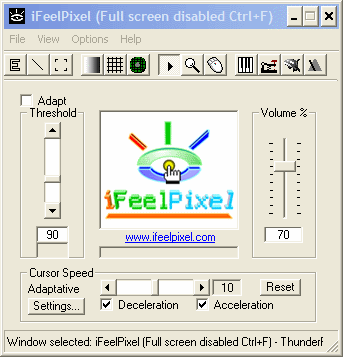 
Tactile Images: feeling the relief of images (View the Flash video)
- New multimodal file menubar
I. Visual Feedback (To enable pseudo-haptic effects with a simple mouse)
II. Haptic feedback is divided into 3 parts:
1. Rumble Feedback (To enable Rumble effects for Nintendo Wiimote).
2. Tactile Feedback (To enable Tactile effects for TouchSense devices).
3. Force Feedback (To enable force effects for Novint Falcon).
III. Auditory Feedback is divided into 3 parts:
1. Sound Card Feedback
2. Internal Speakers
3. Narrator Voices
2.
Updated Options
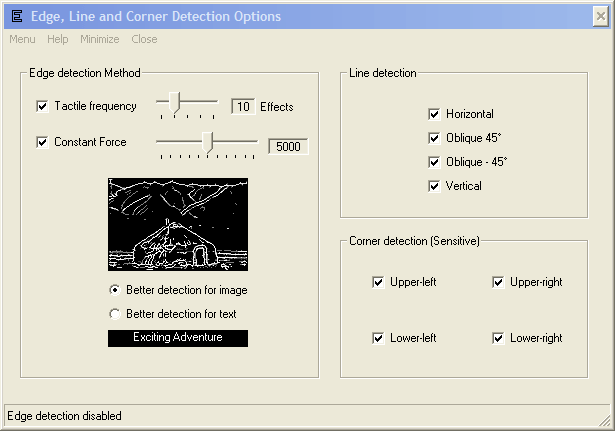
- Edge settings, Line settings and Corner settings are grouped on 1 window (v.0.9.1).
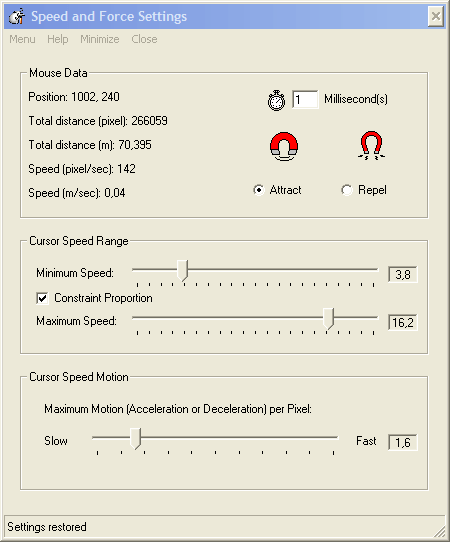
- In the "Speed and Force Settings" window under "File" menu,
you can choose if you prefer an attraction effect or repulsion effect for Visual Feedback and Novint Falcon.
Also you can modify the timer interval (refresh speed). (v.0.9.1)
- "Media Center" has been updated and renamed to "Force Ressource" (v.0.9.0)
- "Reload Immersion Plugin" has been added in "Force Ressource" (v.0.9.0)
- "iFeelPixel Research" has been renamed to "Clipboards Monitoring " (v.0.9.0)
3.
New Options
- Novint Falcon Options (v.0.9.1)
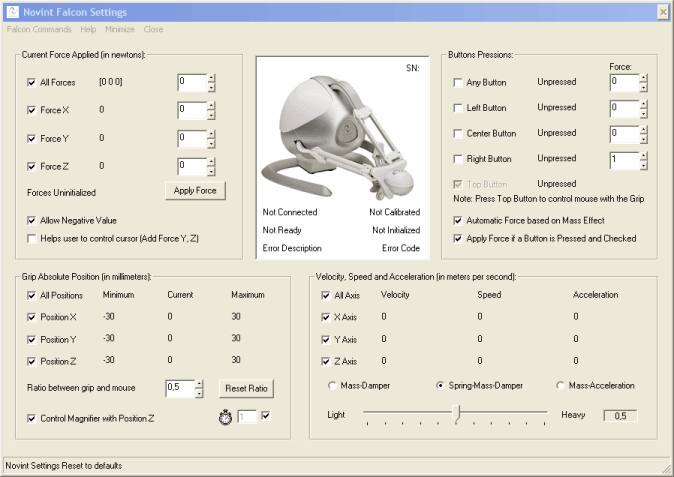
Falcon Commands:
- Uninitialize Falcon
- Initialize Falcon
-
Control Mouse
- Clear Forces
- Force Safety
- Reset Settings
-
The software automatically set the Falcon to control the mouse upon launch.
- Automatic Force based on Mass Effect.
Selection choices: mass-damper, spring-mass-damper or mass-acceleration.
The mass value is in Kilogram.
Possibility to disable/enable every axis.
Possibility to disable/enable every position.
Help:
- Novint Advanced Product Group:
Novint’s Advanced Products Group is building on Novint’s early success in the games market to build applications involving user interaction with 3D computer data, models or environments in other markets including medical & military simulation & training, simulation/visualization, geoscientific, architecture/design, automotive, and telerobotics.
The Value of Haptics
* Improved productivity & efficiency
* Engaging environment increases skill retention
* Improved interpretation and decision making
* Versatility & reconfigurability maximizes cost effectiveness
- Novint Falcon Hardware Requirement:
You need to a Novint Falcon to feel the Force Feedback with iFeelPixel. Please use our Novint Falcon Referral ''ifeelpixel'' (without the quotes).
- Novint Falcon Software Requirement:
You need to download and install Novint Falcon drivers.
- Novint Falcon Calibration:
When starting this software, the Falcon shows a red light, which means that the controller is initiated but has not been calibrated. It does this each time a software is started. To calibrate: Push the handle as far as you can inwards towards the light display with the Novint logo. Pull the handle straight out against you. Repeat until the Novint logo turns blue.
- Novint Falcon FAQs
- Novint Falcon Support
Special thanks to Novint (Bill Anderson, Jonathan Miller) for the Novint Hardware and the haptic library.
4.
Optimizations
- Grid feature does not control anymore novint cursor position (v.0.9.1).
- Minimize and Close buttons are added in the main menu (v.0.9.1)
- Local Search Removed (v.0.9.0)
- Keyboard Piano: Automatic volume checkbox has been added, the volume slider is controlled by main volume slider (v.0.9.0)
- When you enable a feature on the toolbar, it automaticaly disables the others features (v.0.9.0)
- "Mouse data and settings" is updated for the Novint Falcon (Force Safety) (v.0.9.0)
- "Constant force" (See edge options) interacts in correlation with "visual feedback", "tactile feedback" and "Force Feedback" (v.0.9.0).
5.
Others updates
- Clipboard-to-morse checkbox removed (v.0.9.1).
- "Windows caption" checkbox removed from Morse option (v.0.9.0)
- Horizontal or vertical visual Grid can be selected (v.0.9.0)
- Haptic devices names appear on Icon Systray (v.0.9.0)
- View > "More Information" becomes "TouchSense Informations" (v.0.9.0)
- Acceleration and deceleration checkboxes are used to control Novint Falcon forces (v.0.9.0)
- Help > "Bug Report" updated for the Novint Falcon (v.0.9.0)
- "Tactile Feedback" updated for Edge, line, corner detection (v.0.9.0)
-
Keyboards shortcuts updated
- Typo
and spelling corrected
- Help
and "Readme" updated
- Text
options updated
- Messages
box updated
- Status
bar updated
- Tooltip's
updated
- Links updated
- Toolbar updated
- "Splashscreen" updated with Novint Logo.
- Help > "About" updated with Novint Logo.
- "EULA / Credits" updated.
6.
Know issues
List of known issues in this version of iFeelPixel:
. If you try to close or minimize a window in clicking the left or right button on a Novint Grip. The cursor is suddenly stopped. (bug v.0.9.0)
Solution: left-click or right-click with your simple mouse to take back the control of cursor.
. Fatal Error (Novint Falcon): The dynamic link library 'FTD2XX.dll' could not be found (v.0.9.0).
Solution: Please download and install D2XX Drivers
. Fix For Non English Users issue: International compatibility with international version of MicroSoft Windows. Download the international package for iFeelPixel.
· Narrator issue with windows XP SP2 discovered, please download and install english package:
https://www.ifeelpixel.com/download/lhttseng.exe
· Narrator issue with windows Vista discovered: users cannot select the source of sound engine. The sounds are played on sound card, but they cannot be listened via speackers.
The ability to choose a different hardware or software MIDI synthesizer other than the default Microsoft GS Wavetable Software synth has been removed from the user interface for audio configuration in Windows Vista. A different output MIDI synth or output device port can be selected only by editing the registry.
Solution: Right-click on the Volume Mixer icon in the taskbar. That opens the sound settings window. The green “checkmark” should be on your Speakers device (which is attached to your sound card). Disable the other audio output engine listed in Playback Tab.
The list of known issues in all versions of iFeelPixel is available at:
https://www.ifeelpixel.com/support/knowissue.txt
· Error handler for beta tester
If an error occurs, you see an error description on screen and you have 3 choices:
ABORT (Abrupt termination of iFeelPixel program execution and iFeelPixel process running)
RETRY (Performs the action of retrying the action whose failure posted the DialogBox)
IGNORE (Ignore last error generated by iFeelPixel software)
Please be sure to review the list of known issues before submitting a
bug. But if you do find a problem that isn't included on the known
issues list, please let us know by reporting the bug:
https://www.ifeelpixel.com/mail/bug.php
7.
Available Features
Main Features:
-----------File Menu-----------------------------------------------------------------------
- Force Ressource
- Speed and Force Settings (Force Safety for Novint Falcon and Timer Interval)
- Update this software
- Stop all effects!
- Monitoring Selection
- Mouse limitation
- Startup with windows
- Saving/Exporting/Importing/Resetting Settings
- Visual Feedback
- Haptic feedback
--> Rumble Feedback
--> Tactile Feedback
--> Force Feedback
- Auditory Feedback
--> Sound Card Feedback
--> Internal PC speakers
--> Narrator Voices
- Multimodal (All)
-------------------------------------------------------------------------------------------
----------------------Toolbar--------------------------------------------------------------
- Edge detection
- Line detection
- Corner detection
- Color Detection
- Grid Generation
- Texture Generation
- Play/Stop
- Magnifier
- Demo mode
- Keyboard Piano + American Sign Language
- Morse Engine + American Sign Language
- TONAR (Tactile Orientation Navigation And Ranging)
- Metronome System
-------------------------------------------------------------------------------------------
------------------------------View Menu---------------------------------------------------
- Main Display : Stay on top, center of screen, Opacity window, Enable/Disable Vista Aero
- Modify iFeelPixel CPU priority
- Optimize RAM
- Clipboard Viewer (does not work on windows vista)
- Control Panel
- TouchSense information
-------------------------------------------------------------------------------------------
Download
iFeelPixel TactileWare
|