|
Make sure you use the latest Haptic driver for your device (SteelSeries Rival 500/700, iFeel Mouse, Novint Falcon) |
| Fix Rival 700 firmware error |
SteelSeries Rival 700 firmware update problem solved |
|
Analyse, monitor, rate or test your computer and its individual components. Get detailed information about all the components of your computer. |
|
Device Drivers updaters are Windows applications that scans your computer hardware and checks to see if there are new driver updates available for your devices. They also locates drivers for "unidentified devices" in the Windows Device Manager. |
|
Speccy is an advanced System Information tool for your PC. |
iFeelPixel
should work with all DirectX compatible sound cards correctly
installed.
No sound?
Please upgrade Microsoft Windows Media player.
Sound issue?
It's recommended to update your Sound card driver:
DirectX
compatible sound card drivers
Sound
card information and help
|
iFeelPixel
should work with all DirectX compatible video cards correctly
installed.
Video
issue?
It's recommended to update your Video card driver:
DirectX
compatible video card drivers
Video
card information and help
|
|
|
|
Windows Update is the online extension of Windows that helps you get the most out of your computer. |
The
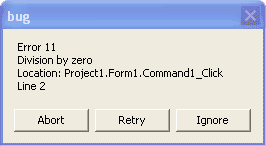
program freezes (locks-up, crashes, hangs-out ...) or PC reboot |
 Note:
this is not an iFeelPixel-specific error, but is related to
the software/hardware configuration. If iFeelPixel freezes,
other games/program will freeze with the same configuration. Note:
this is not an iFeelPixel-specific error, but is related to
the software/hardware configuration. If iFeelPixel freezes,
other games/program will freeze with the same configuration.
To solve the problem:
1. First of all, restart your PC Sometimes, these strange
errors are caused by a temporary conflict with some drivers
or programs.
2. Some opened applications can create the problem.
Please close all open programs, then run iFeelPixel.
3.
a. The problem can be related to the
Video
Card drivers.
You can check the web page of your Video Card manufacturer
for updated drivers. To see the Video card you are using,
click on View >> Control Panel >> Display >>
Settings tab >> Advanced button >> Adapter tab.
b.
The problem can be related to the
Sound
Card drivers.
You can check the web page of your Sound Card manufacturer
for updated drivers. To see the Sound card you are using,
click on View >> Control Panel >> Sound and Audio
Devices >> Hardware tab.
4.
a. Some advanced
video
cards can create problems.
Click on View >> Control Panel >> Display >>
Settings tab >> Advanced button >> Troubleshooting
tab. Decrease the video hardware acceleration to correct possible
problems. Try all positions from "Full" to "None".
b.
Some advanced
sound
cards can create problems.
Click on View >> Control Panel >> Sound and Audio
Devices >> Audio tab >> Advanced button >>
Performance tab. Decrease the audio hardware acceleration
to correct possible problems. Try all positions from "Full"
to "None". |
Microphone
headsets
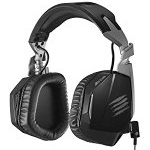
Headset Haptic Technology
|
Microphone
headsets may not run at the same time with iFeelPixel depending
on your sound card. iFeelPixel appears to run fine with microphone
headsets using later sound cards, but not all sound cards
will support headsets with iFeelPixel.
We recommend you to use headsets with ViviTouch, Lofelt or Razer Technology. You may disable the Microphone headset to improve the sound quality. |
iFeelPixel
crashes when I play video or audio (ActiveMovie crashes) |
iFeelPixel
may crash because you don't have the proper codecs installed
to play the file, or they are improperly installed. If this
is the case, remove existing codec packages (such as Nimo)
and download the Microsoft Windows Media player. It should work well for playing
back video and audio files.
Know
issues:
"QUARTZ.DLL" causes crashes. It seems to be an audio/video
decoder. Apparently there is a number of problems with older
versions of the file, so you might want to try and find a
newer one.
Alternative install:
List
of Codecs & Filter pack (DivX, FFdshow, Tsunami) |
Audio
Issues with CpuIdle
Weird cracks in music with RMClock enabled |
1.
My audio is all scratchy when CpuIdle (or RMclock) is running.
2. When I run CpuIdle (or RMclock) I hear terrible static noise or buzzing
sound through the speakers attached to my sound card. What is DPC Latency? |
| ImmRAPIStub.exe Crash |
You receive a generic error when you use iFeelPixel with a tactile mobile phone and you try to exit out of the software.
Solution: close the ImmRAPIStub error window, next time you start the application, try to increase or decrease priority. |
| Software closes abruptly |
After the activation process, if this software closes abruptly, there is a problem of compatibility on your machine. Please contact us to fix this issue with our remote assistance. |













 It
Keeps Crashing
It
Keeps Crashing