|
Hardware Requirements | TouchSense Device? | Software Required | Change List | Change Logs
 |
 iFeelPixel Beta Version 4.0.4 Released iFeelPixel Beta Version 4.0.4 Released
|
 |

|
Thanks for your interest in iFeelPixel for Windows platform.
This TactileWare is compatible with Operating System W7 / W8 / W10
The basic edition of iFeelPixel™ is a "DonationWare": it literally means that non-commercial users can make a donation of any amount to help support further development or they can become official members.
Before downloading the iFeelPixel software from our web site, please donate to get a basic edition or register a licensed professional edition, then you will be redirected to the payment processor. |
| Gumroad (PayPal and credit card) is the recommended payment method. You will be emailed a download link immediately after your donation, subscription or purchase. Your TactileWare will never expire. No shipping fees, no waiting, instant gratification! See Installing iFeelPixel instructions. |
If you want the best haptic experience for Multiple Screens, Video Games, Virtual Reality apps and Multimedia players, we recommend you to purchase directly the professional edition.
|
|
|
| Recommended for Multi-Screen, Video Game, Virtual Reality and Media player (1 year support) |
| |
|
|
|
| Renewable membership in 2 times or 1 time a year (Lifetime Support) |
| |
|
|
|
| Donation version can only be used for Single Screen (30 days support, min amount: 0.99 Euro) |
As a counter-spam measure, Gumroad disabled the "Import customers" feature since May 2020. We can't do anymore manual registration for the Professional License. We advise new users to automatically register with Gumroad.
Forgot your license key or Download Link?
If you need to retrieve your license key, please go to app.gumroad.com/license-key-lookup.
Novint Falcon owners can try the basic edition or register above.
To date, no final version is envisaged.
All the users of iFeelPixel are, in best case, beta-testers.
After your evaluation period, you can give your point of view and your comments may be selected to appear on our website.
We
will NOT sell, rent, or give away your personal
contact information.
See our privacy policy for details.
If you do not receive our E-mail about iFeelPixel software,
please read this Troubleshooting
Section.
For proper use of this website, please add www.ifeelpixel.com to your list of trusted websites. Thanks.
Hardware
Requirements - Haptic devices
|
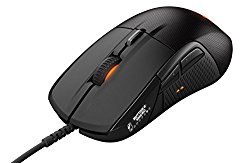
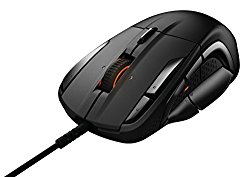
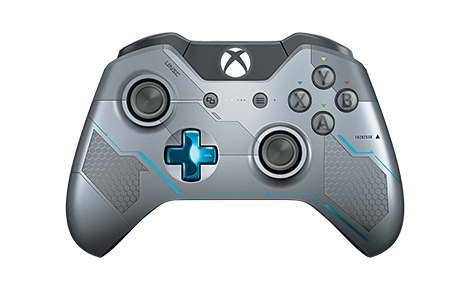
· You need a Tactile Mouse with zero-recoil (SteelSeries Rival 710/700/500) or Xinput Device (Xbox 360/One/S/X/Elite) to feel tactile alerts.
reWASD is required for Switch Pro/JoyCons/PS4 DualShock/PS5 DualSense Gaming Controllers.
· You need a generic control device (Mouse, Trackball, Touchpads) to feel Visual Force Feedback on screen (Cursor pointer will move slower or faster).
iFeelPixel determines how far the pointer moves on the computer screen in response to how far you move the mouse for correct ratio between Mouse Motion (hand) and Visual Sensations (eyes).
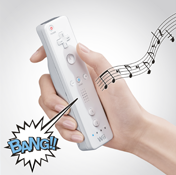
· You need a Nintendo WiiMote to feel rumble feedback
(Deprecated support, it is enhanced by Nintendo JoyCons/PRO Controllers with HD rumble!)
|
Shaped like a TV remote, the Wii Remote is been designed to be easily used by beginners and pros alike. Sensors determine the Wii Remote's position is in 3-D space, which means that racing-game steering and a tennis swing, for example, are done through movements of your hand rather than by just your thumbs. What's more, a tiny speaker built into the Wii Remote promises some interactive surround sound experiences. The controller also has a force feedback "Rumble" feature. The Wii Remote communicates via the Bluetooth wireless standard.
Connect Wiimote to computer via Bluetooth |
· You need a tactile mobile phone (Samsung sgh-i900 Omnia) to feel vibro-tactile feedback
(SmartPhones support has been removed in TouchSense studio by Immersion Corporation)
· You need a TouchSense Mouse or DirectX device (Gamepad/Joystick) to feel tactile feedback
(Logitech has discontinued TouchSense Mouse drivers support for 64bits OS)
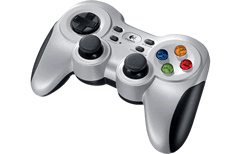 |
Logitech F710 CORDLESS GAMEPAD
DUAL VIBRATION FEEDBACK MOTORS*
Feel the Game! Discover a new level of feedback you can feel with every hit, crash and explosion in games that support vibration feedback. Designed for the PC gamer looking for an advanced console-style controller. Play console ports with their native-style controller or adopt a more relaxed position while enjoying PC games. F710 is easy to set up and use with your favorite games thanks to XInput/DirectInput, the two most common input standards. Compatible with Windows 64 bits OS.
*Requires Logitech Gaming Software installation for DirectInput mode. |
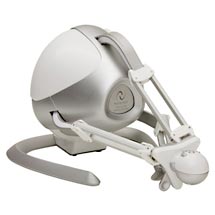
· You need a Novint Falcon to feel full force feedback
(Novint website is offline, but we continue to support the Falcon)
|
Novint Falcon Specifications**
3D Touch Workspace: 4" x 4" x 4"
Force Capabilities: 2 lbs (1 Kg)
Position Resolution: 400 dpi
Quick Disconnect Handle: 1 sec. change time
Communication Interface: USB 2.0
Size: 9" x 9" x 9"
Weight: 6 lbs (3 Kg)
Power: 30 watts, 100V-240V,50Hz-60Hz
|
“The Novint Falcon is more advanced than any gaming peripheral on the market“ PC Mag
|
CPU
/ RAM: |
1
GHz (minimal) / 512 Mo |
Disk
Space: |
1.5 GB free disk space |
Screen
display mode: |
256
colors, 16 bit or 32 bit (recommended) |
|
any
resolution, but 800*600 is recommended |
|
Normal
(recommended, font by default) |
Audio: |
|
Video: |
|
*
recommended 100% compatible with iFeelPixel™
** Logitech Wingman Force Feedback mouse and Novint Falcon are recommended for
blind users.
Please buy a product to support further development.
Why
buy a TouchSense Device?
Haptics is receiving broad, global acceptance. Over 300 million devices using Immersion’s haptic systems have been shipped around the world. That number is growing rapidly.
"The very common response that we get from people
is that once they start using a force feedback interface device
for some of their work, whether it be in entertainment or
scientific analysis, they really don't want to go back"
"You can't underestimate how important the sense of
touch is to the basic human experience of engaging. Once you
have it, you want that natural intuitive experience"
- Dr. Louis Rosenberg, Immersion
Corporation, San Jose
"The addition of tactile feedback to computer mice
can significantly enhance user performance."
"Our laboratory studies show that people complete basic
cursor targeting tasks faster with tactile feedback."
- Jack Dennerlein, Assistant Professor of
Ergonomics and Safety at Harvard
University
|
iFeelPixel™
TactileWare is optimized for iFeel™ Mouse, Novint Falcon, SteelSeries Rival 500/700/710 and Xbox controllers
 Note:
If you don't own a TouchSense
Device, don't worry...you can use the iFeelPixel software
with a simple mouse because tactile effects are replaced
by visual force feedback (pseudo-haptic) or sound effects. Note:
If you don't own a TouchSense
Device, don't worry...you can use the iFeelPixel software
with a simple mouse because tactile effects are replaced
by visual force feedback (pseudo-haptic) or sound effects.
"What
You See is What you Feel" (WYSIWYF)
|
Immersion TouchSense-enabled MICE & TRACKBALLS (Archived)
TouchSense-enabled
JOYSTICKS & GAMEPADS (Archived)
TouchSense Handsets & SmartPhones
(Archived)
Touch-enabled
devices definition
Device
differences?
Compare all mice
Software
Requirements, Free Software Downloads (third parties)
You must install the device drivers BEFORE installing iFeelPixel.
| |
|
|
|
VibeTonz Studio (Required only for Haptic Mobile)
The VibeTonz® API is integrated on a variety of mobile devices containing VibeTonz® Mobile Player. For the latest list of devices supported by VibeTonz® Studio, please visit the Immersion VibeTonz Developer Web site at developer.immersion.com (Archived)
|
|
Novint Falcon Fatal Error: if the dynamic link library 'FTD2XX.dll' could not be found.
|
|
Run-time files *
|
|
|
|
|
|
PLAY ANY COMPUTER GAME WITH YOUR FAVORITE GAMEPAD OR JOYSTICK
- compatible with any PC Controller, XBox 360/One/Elite, PlayStation DS3/DS4, Wiimote, Switch JoyCons/PRO!
EMULATE YOUR KEYBOARD AND MOUSE WITH THIS POWERFUL PROFILER SOFTWARE
- use your game controller to do anything you can do with a keyboard and mouse!
|
|
Program for using Wii Remote on Windows PC. |
|
BlueTooth drivers for connecting Nintendo WiiMote |
|
Programmable Input Emulator: Control Games with Gestures, Speech, and Other Input Devices (Nintendo Wii Remote, Novint Falcon) |
|
Operating
System
 |
|
*
Required but packaged with iFeelPixel setup, no further software
installation is necessary.
**
English/American version of
windows are recommended (International users)
End of support for Windows XP/Vista (deprecated since iFeelPixel version 2.6.2)
|