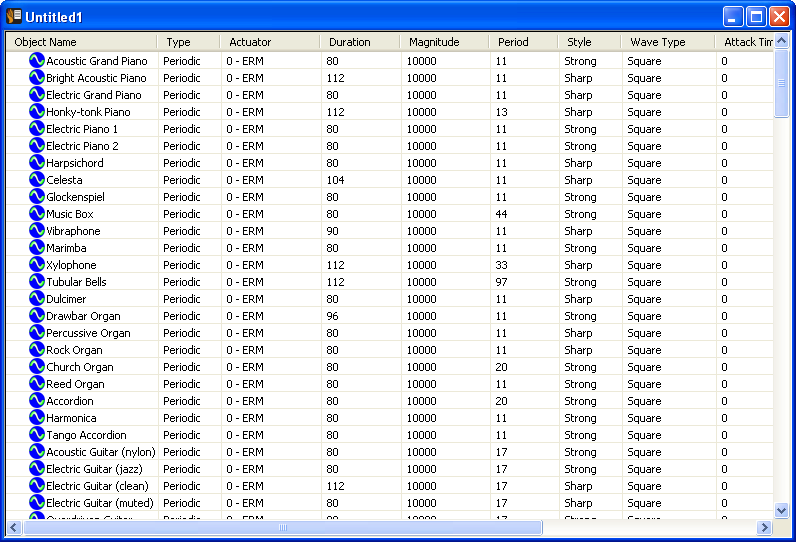
Although the effect editors are useful for tailoring individual basis effects, some situations may require comparing and/or modifying parameters of several effects at the same time. The List View provides a selection for viewing multiple effects and parameters at once.
Upon choosing Details from the View menu, the Editor Tab View is hidden and the List View expands to display the IVS file in tabular form.
Each of the cells in the table can be edited. Once a parameter is edited, the basis effect can be selected and played.
The parameters for Multimedia and Timeline objects are not displayed in the Details List view. However, they can be selected and played.
The Details List View can sort the columns containing text alphabetically and columns containing numbers are sorted numerically. If a column header is clicked twice, it is sorted by the column's value in reverse order. The following gives a brief description of how the different column headers are sorted.
Items in the Details List View (Periodic, MagSweep, Timeline, and media objects) can be copied and pasted into the current document or into another document.
When a Timeline effect is copied, all of the basis effects (Periodic and MagSweep) that are in the original Timeline are also copied.
When pasting a Timeline effect, two options are given:
If Paste Effects Only is selected, this creates a copy of only the effects that are selected. If just the Timeline is selected, it creates a duplicate Timeline effect,but it does not duplicate the MagSweep and Periodic effects that the Timeline effect references. Instead, the new Timeline that is copied, references the same Periodic and MagSweep effects that the original Timeline effect references.
If, however, either the Periodic or MagSweep effect is later modified, it effects the original Timeline effect AND the copy of the Timeline effect.
Paste Effects and Referenced Effects copy the Periodic and MagSweep effects that are contained in the Timeline, even if only the Timeline effect is selected. This way there is a complete duplicate copy of the Timeline and everything it contains. If a Periodic effect is modified, it only affects the original Timeline. If the copy of a Periodic effect is modified, only the copy of the Timeline is affected.
Immersion and
are trademarks of Immersion Corporation.
All other trademarks are the property of their respective owners.
© 2010 Immersion Corporation.
Visit developer.immersion.com
for the latest in
news and information.